Edit Grid Assist Settings

This guide explains how to modify your Grid Assist settings and what to expect when making changes.

Written By Ehsaan XP

Last updated About 2 months ago

New Grid update allows users to modify Grid Assist configurations without interrupting active strategies where possible, improving flexibility and user experience while reducing friction in the analytical process.

Key Features

  • Editable Without Canceling Orders:

    • Trailing up/down, stop prices, trigger conditions, grid level adjustments.

    • Changes apply seamlessly without resetting unrealized profits.

  • Editable With Order Cancellation:

    • Trading capital amount, grid quantity, price limits.

    • Unrealized profits reset; new orders created after rebalancing.

  • Non-Editable Settings:

    • Exchange, pair, profit currency, strategy type.


Important Considerations

💡 Before making changes, please note:

  • Modifying certain settings will reset your profitability statistics

  • Some changes require cancellation of existing orders

  • If you want to preserve statistics, consider creating a new Assist instead

Settings You Can Edit Without Canceling Orders

  • Trailing up

  • Trailing down

  • Downward Price Protection (on/off)

  • Lower Stop Price

  • Upper Stop Price

  • Start/Stop Trigger Conditions

  • Add/remove Upper Grid Level

  • Add/remove Lower Grid Level

Settings That Require Order Cancellation

💡 The following changes will cancel existing orders and create new ones:

  • Trading capital

  • Lower limit price

  • Upper limit price

  • Grid quantity

Non-Editable Settings

💡 These settings cannot be modified after creation:

  • Exchange

  • Trading pair

  • Geometric/Arithmetic grid type

  • Profit currency

Editing your Grid AI Assist

Step 1. Click the Assist details of the running Grid

Step 2. Look for and click the "Edit" button

Step 3. Modify your desired settings

Step 4. Click “Save changes” button

  • If you edit any of these fields, a confirmation popup will appear warning that your profit statistics will be reset. If you want to proceed with the new settings, click the "Save changes" button. Please note that all your open orders will be canceled and new ones will be placed

    • Trading capital amount

    • Lower limit price

    • Upper limit price

    • Grid quantity

  • If your current profit statistics are important, cancel the settings changes by clicking the "Cancel" button

Step 5. That's it! Your Grid AI Assist is now updated and continues to run without needing to cancel orders or start a new Assist.

After Editing

When changes are saved:

  • For non-canceling changes: Your grid will continue operating with the new parameters

  • For order-canceling changes: Your grid will close open orders and place new orders based on the updated settings, due to this unrealized profit, Current market value and Total profit will reset

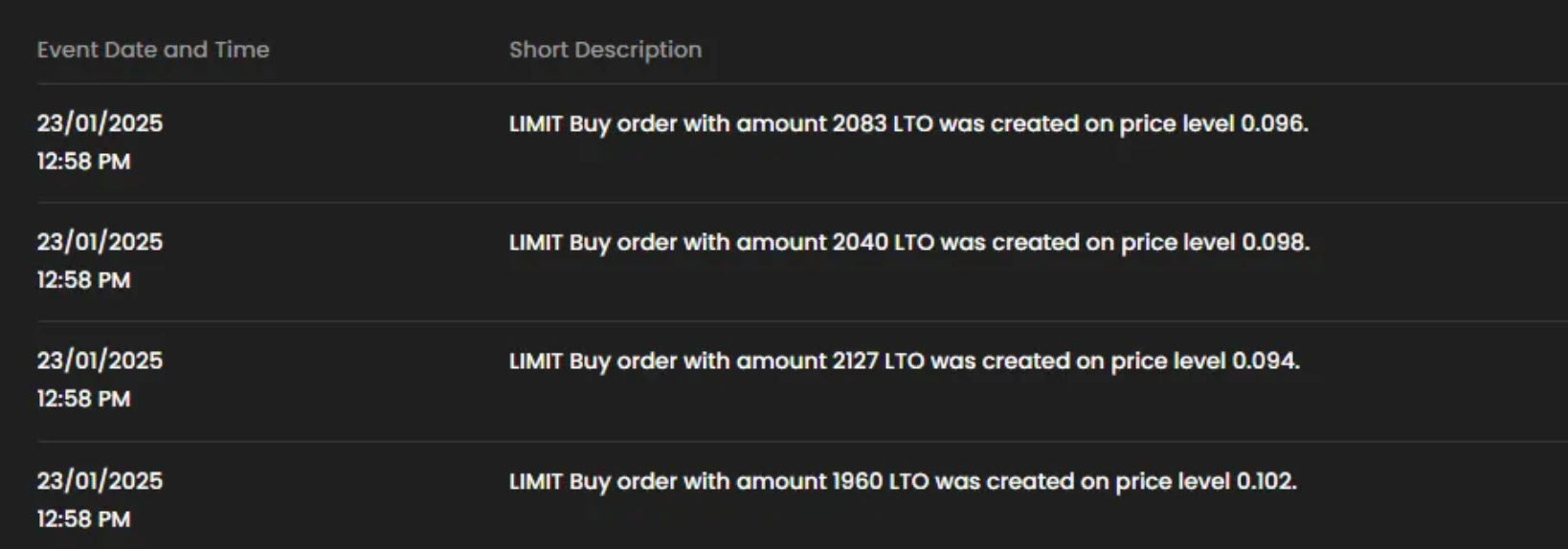
  • A new event message will appear in your history: "GRID Assist edited. New orders created"

💡 Remember: If you want to preserve your current statistics and avoid order cancellations, it's recommended to create a new Assist instead of editing an existing one.

Let’s look at some detailed examples!

💡 Disclaimer: The Grid AI Assist settings shown below are for example purposes only and should not be considered advice for configuring your own Assists.

Case 1. Editing fields that do not trigger rebalancing

User has a running Grid AI assist with the following settings:

Setting

Value

Strategy

Bullish

Trading pair

INJ/USDT

Trading Capital

1000 USDT

Upper Limit Price

26

Lower Limit Price

20

Grid Quantity

10

Grid Size

2.66%

Order Size

100 USDT

Trailing up

enabled

Downward price protection

disabled

Upper Stop price

disabled

Lower Stop price

disabled

Start Trigger Conditions

Instant

Stop trigger Conditions

Manual

Step 1. Click the Assist details of the running Grid

Step 2. Look for and click the "Edit" button

Step. 3. Edit some of the fields as following

Setting

Value

Change to

Strategy

Bullish

Non-Editable Settings

Trading pair

INJ/USDT

Non-Editable Settings

Trading Capital

1000 USDT

-

Upper Limit Price

26

-

Lower Limit Price

20

-

Grid Quantity

10

-

Grid Size

2.66%

unable to change manually

Order Size

100 USDT

unable to change manually

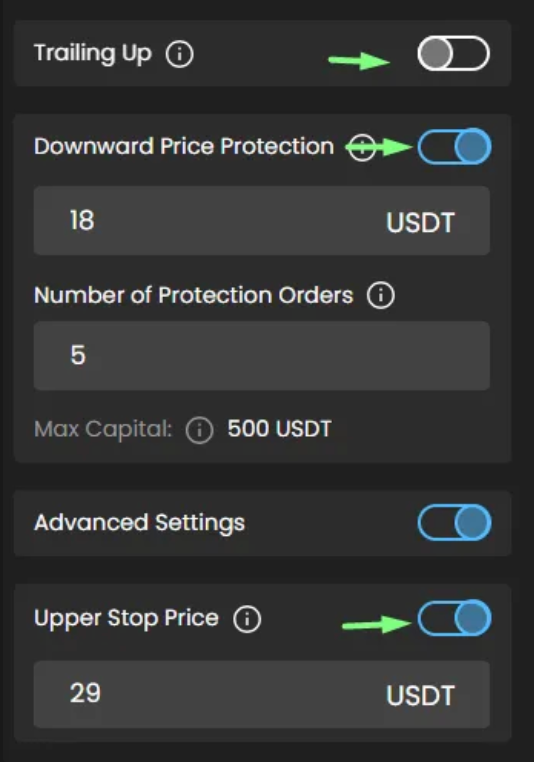
Trailing up

enabled

disable

Downward price protection

disabled

Enable and set as below:
- Downward Price Protection - 18 USDT
- Number of Protection Orders - 5 (Max Capital calculated automatically - 500 USDT

Upper Stop price

disabled

Enable and set as below:
- Upper Stop Price - 29 USDT

Lower Stop price

disabled

Enable and set as below:
- Lower Stop Price - 17 USDT
- Sell

Start Trigger Conditions

Instant

Non-Editable Settings for running Grid

Stop trigger Conditions

Manual

Trading View(TV) Alert

BEFORE

AFTER

Step 4. Save updated settings by clicking “Save Changes” button

After Editing:

When changes are saved

Parameter

Status After Edit

Grid Operation

Continues with new parameters

Realized Profit

Remains the same

Unrealized Profit

Remains the same

Market Value

Remains the same

Total PnL

Remains the same

Trading Capital

Remains the same

Reserved Funds

Remains the same

General Info

Remains the same

Note: Changes made to any of the fields below DO NOT reset profit statistic

  • Trailing up

  • Trailing down

  • Downward Price Protection (on/off)

  • Lower Stop Price

  • Upper Stop Price

  • Start/Stop Trigger Conditions

  • Add/remove Upper Grid Level

  • Add/remove Lower Grid Level

BEFORE

  • Orders

AFTER

  • Orders

  • Events

Case 2. Editing fields that trigger rebalancing

Editing Trading capital field and Upper Limit Price

User has a running Grid AI assist with the following settings:

Setting

Value

Strategy

Bullish

Trading pair

AAVE/USDT

Trading Capital

500 USDT

Upper Limit Price

396.08

Lower Limit Price

333

Grid Quantity

10

Grid Size

6.31 USDT

Order Size

50 USDT

Trailing up

enabled

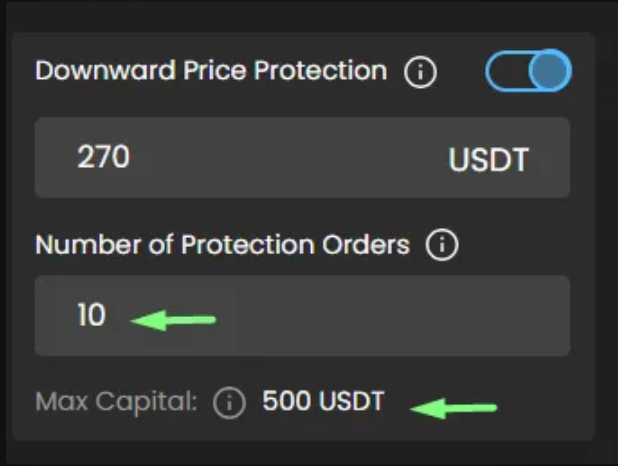
Downward price protection

Enabled
- Downward Price Protection - 270
- Number of Protection Orders - 10 ( Max capital - 500 USDT)

Upper Stop price

disabled

Lower Stop price

disabled

Start Trigger Conditions

Instant

Stop trigger Conditions

Manual

Step 1. Click the Assist details of the running Grid

Step 2. Look for and click the "Edit" button

Step. 3. Edit some of the fields as following

Setting

Value

Change to

Strategy

Bullish

Non-Editable Settings

Trading pair

AAVE/USDT

Non-Editable Settings

Trading Capital

500 USDT

1000 USDT

Upper Limit Price

396.08

380

Lower Limit Price

333

Leave as it is

Grid Quantity

10

Leave as it is

Grid Size

6.31 USDT

Automatically updated to after changing Upper Limit Price
- 4.7 USDT

Order Size

50 USDT

Automatically updated to after changing Trading Capital
- 100 USDT

Trailing up

enabled

Leave as it is

Downward price protection

Enabled
- Downward Price Protection - 270
- Number of Protection Orders - 10 ( Max capital - 500 USDT)

Updated automatically after Trading Capital and Upper Price limit were changed
-
DPP - 270 (remained the same
- Number of protection orders - 14
- Max capital - 1400 (recalculated)

Upper Stop price

disabled

Leave as it is

Lower Stop price

disabled

Leave as it is

Start Trigger Conditions

Instant

Leave as it is

Stop trigger Conditions

Manual

Leave as it is

Step 4. Save updated settings by clicking “Save Changes” button

Step 5. On Balancing popup click “Proceed” button

BEFORE

AFTER

After Editing:

When changes are saved

Parameter

Status After Edit

Grid Operation

- Continues operating with new parameters;
- All open orders have been cancelled;
- New orders have need created based on new settings ;
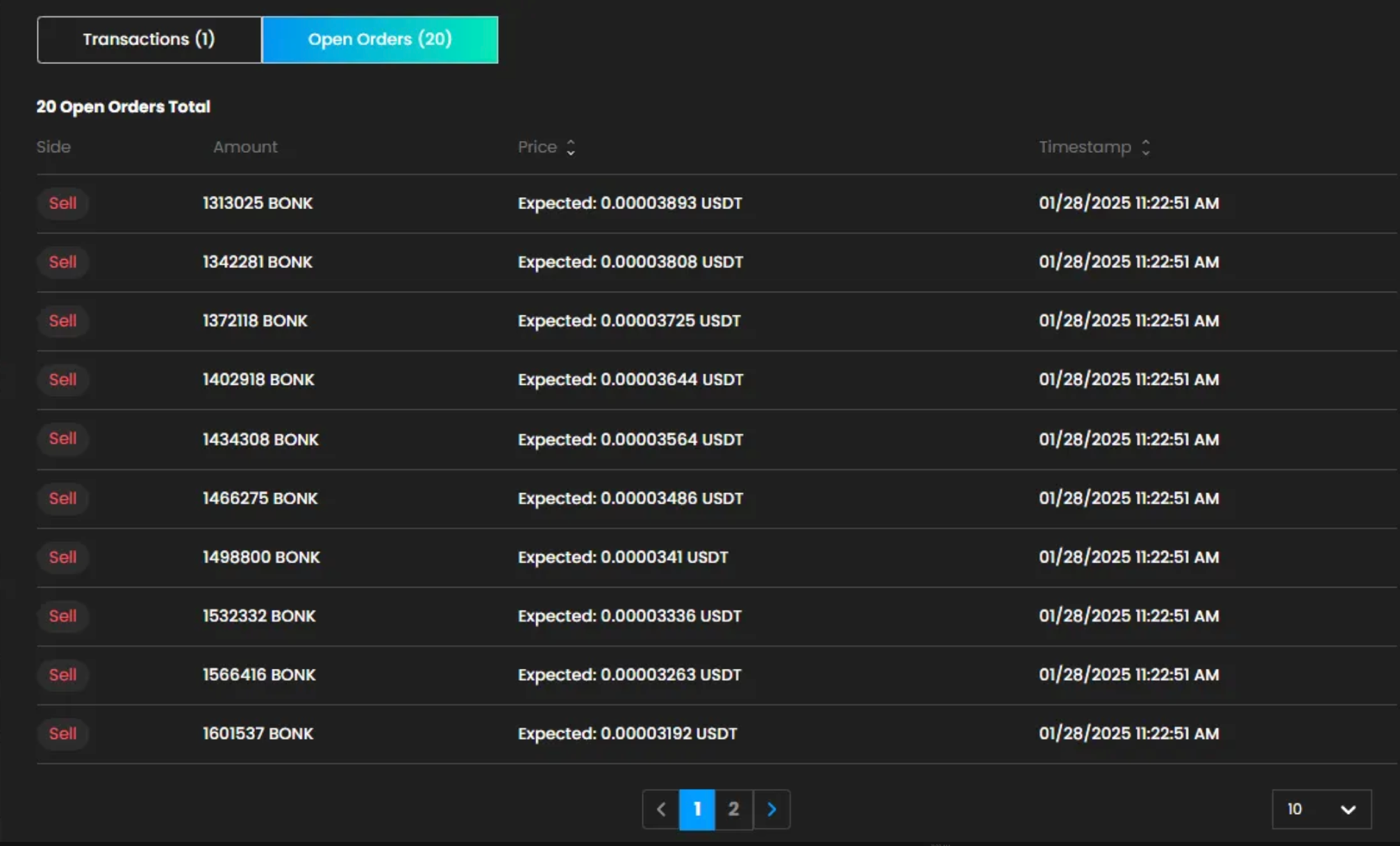
- In open orders you can see that New orders have different Order size and Grid Size (step between orders has been changed)

Realized Profit

Remains the same

Unrealized Profit

It is reset and is calculated based on newly created orders

Market Value

It is reset

Total PnL

It is reset

Trading Capital

It is updated

Reserved Funds

It is updated based on the newly created orders

General Info

Remains the same

BEFORE

  • Profit

  • Orders

AFTER

  • Profit

  • Orders

  • Events

Note: Changes made to any of the fields below RESET profit statistic

  • Trading capital

  • Lower limit price

  • Upper limit price

  • Grid quantity

Editing Grid Quantity and Trading Capital

User has a running Grid AI assist with the following settings:

Setting

Value

Strategy

Bullish

Trading pair

BONK/USDT

Trading Capital

10.1 USDT

Trading Capital currency

USDT

Upper Limit Price

0.00003893

Lower Limit Price

0.00002504

Grid Quantity

10

Grid Size

4.51 %

Order Size

1.01 USDT

Trailing up

enabled

Downward price protection

Disabled

Upper Stop price

Disabled

Lower Stop price

Disabled

Start Trigger Conditions

Instant

Stop trigger Conditions

Manual

Step 1. Click the Assist details of the running Grid

Step 2. Look for and click the "Edit" button

Step. 3. Edit some of the fields as following

Setting

Value

Change to

Strategy

Bullish

Non-Editable Settings

Trading pair

BONK/USDT

Non-Editable Settings

Trading Capital

10.1 USDT

increase to 1000

Trading capital currency

USDT

Leave as it is

Upper Limit Price

0.00003893

Leave as it is

Lower Limit Price

0.00002504

Leave as it is

Grid Quantity

10

increase to 20

Grid Size

4.51 %

Automatically updated to after changing Grid Quantity
- 2.23 %

Order Size

1.01 USDT

Automatically updated to after changing Trading Capital and Grid Quantity
- 50 USDT

Trailing up

enabled

Leave as it is

Downward price protection

Disabled

Leave as it is

Upper Stop price

Disabled

Leave as it is

Lower Stop price

Disabled

Leave as it is

Start Trigger Conditions

Instant

Leave as it is

Stop Trigger Conditions

Manual

Leave as it is

BEFORE

AFTER

Step 4. Save updated settings by clicking “Save Changes” button

Step 5. On Balancing popup click “Proceed” button

After Editing:

When changes are saved

Parameter

Status After Edit

Grid Operation

- Continues operating with new parameters;
- All open orders have been cancelled;
- New orders have need created based on updated settings;
- In open orders you can see that New orders have different Order size and Grid Size (step between orders has been changed)

Realized Profit

Remains the same

Unrealized Profit

It is reset and is calculated based on newly created orders

Market Value

Remains the same

Total PnL

It is reset

Trading Capital

Remains the same

Reserved Funds

Remains the same

General Info

Remains the same

BEFORE

  • Profit

  • Orders

AFTER

  • Profit

  • Orders

  • Events

💡 Note: Changes made to any of the fields below RESET profit statistic

  • Trading capital

  • Lower limit price

  • Upper limit price

  • Grid quantity

Case 3. Editing Grid in Protection state

Option 1. Running Grid is in protection and user changes Upper/Lower Price limit and Trading Capital

User has a running Grid AI assist with the following settings:

Setting

Value

Strategy

Bearish

Trading pair

CFX/USDT

Trading Capital

500 USDT
500 CFX

Trading Capital currency

USDT

Upper Limit Price

0.145

Lower Limit Price

0.13

Grid Quantity

10

Grid Size

0.0015 USDT

Order Size

375.31 CFX

Trailing down

Enabled

Upward price protection

Enabled
- Upward Price Protection - 0.1595 USDT
- Number of protection orders - 10
- Max trading capital - 3751 CFX

Upper Stop price

Disabled

Lower Stop price

Disabled

Start Trigger Conditions

Instant

Stop trigger Conditions

Manual

Step 1. Click the Assist details of the running Grid

Step 2. Look for and click the "Edit" button

Step. 3. Edit some of the fields as following

Setting

Value

Change to

Strategy

Bearish

Non-Editable Settings

Trading pair

CFX/USDT

Non-Editable Settings

Trading Capital

500 USDT
500 CFX

700 USDT/700 CFX

Trading Capital Currency

USDT/CFX

Leave as it is

Upper Limit Price

0.145

0.156

Lower Limit Price

0.13

Leave as it is

Grid Quantity

10

Leave as it is

Grid Size

0.0015 USDT

Automatically updated after editing the Upper limit price
- 0.0026

Order Size

379.6 CFX

Automatically updated after editing the Trading capital and Upper limit price
- 525.14 CFX

Trailing up

Enabled

Leave as it is

Upward price protection

Enabled
- Upward Price Protection - 0.1595 USDT
- Number of protection orders - 10
- Max trading capital - 3796 CFX

Automatically updated after changing Trading Capital and Upper limit price and as result Grid size and Order size were updated
- U
PP - 0.1595 USDT(wasn’t changed)
- Number of protection orders - 2
- Max Capital - 1050.28 CFX

Upper Stop price

Disabled

Leave as it is

Lower Stop price

Disabled

Leave as it is

Start Trigger Conditions

Instant

Leave as it is

Stop trigger Conditions

Manual

Leave as it is

BEFORE

AFTER

Step 4. Save updated settings by clicking “Save Changes” button

After Editing:

When changes are saved

Parameter

Status After Edit

Grid Operation

Continues with new parameters:
- all open orders have been cancelled, including Price protection orders;
- new orders have been created;
- new protection orders have been created based on new parameters;
- In open orders you can see that New orders have different Order size and Grid Size (step between orders has been changed)

Realized Profit

Remains the same

Unrealized Profit

It is reset based on new open orders

Market Value

It is reset based on new open orders

Total PnL

It is reset based on new Unrealized profit

Trading Capital

It is reset according to new parameters

Reserved Funds

It is reset according to new parameters

General Info

Remains the same

💡 Note: Changes made to any of the fields below may CANCEL open Price protection orders and RESET profit statistic

  • Trading capital

  • Upper Limit Price

  • Lower Limit Price

  • Grid Quantity

  • Enable/disable Upper/Lower price protection

BEFORE

  • Profit

  • Orders

AFTER

  • Profit

  • Orders

  • Events

Option 2. Running Grid is in protection and user changes Upper/Lower Price limit and disabling Price protection

User has a running Grid AI assist with the following settings:

Setting

Value

Strategy

Bearish

Trading pair

CFX/USDT

Trading Capital

700USDT
700CFX

Trading Capital currency

USDT

Upper Limit Price

0.14

Lower Limit Price

0.13

Grid Quantity

10

Grid Size

0.001 USDT

Order Size

534.81 CFX

Trailing down

Enabled

Upward price protection

Enabled
- Upward Price Protection - 0.155 USDT
- Number of protection orders - 15
- Max trading capital - 7999.05 CFX

Upper Stop price

Disabled

Lower Stop price

Disabled

Start Trigger Conditions

Instant

Stop trigger Conditions

Manual

Step 1. Click the Assist details of the running Grid

Step 2. Look for and click the "Edit" button

Step. 3. Edit some of the fields as following

Setting

Value

Change to

Strategy

Bearish

Non-Editable Settings

Trading pair

CFX/USDT

Non-Editable Settings

Trading Capital

700USDT
700CFX

Leave as it is

Trading Capital Currency

USDT

Leave as it is

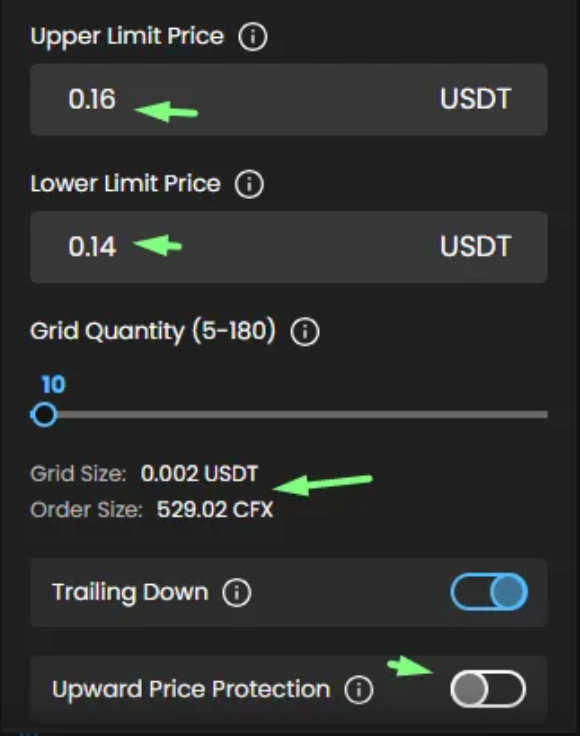
Upper Limit Price

0.14

0.16

Lower Limit Price

0.13

0.14

Grid Quantity

10

Leave as it is

Grid Size

0.001 USDT

Automatically updated after editing the Upper and Lower limit price
- 0.002

Order Size

528.42 CFX

Remains the same

Trailing up

Enabled

Leave as it is

Upward price protection

Enabled
- Upward Price Protection - 0.155 USDT
- Number of protection orders - 15
- Max trading capital - 7908.3 CFX

Disable

Upper Stop price

Disabled

Leave as it is

Lower Stop price

Disabled

Leave as it is

Start Trigger Conditions

Instant

Leave as it is

Stop trigger Conditions

Manual

Leave as it is

BEFORE

AFTER

Step 4. Save updated settings by clicking “Save Changes” button

After Editing:

When changes are saved

Parameter

Status After Edit

Grid Operation

Continues with new parameters:
- all open orders have been cancelled, including Price protection orders;
- new orders have been created;
- Grid is now in Running state so no Protection orders are created ;
- In open orders you can see that New orders have different Order size and Grid Size (step between orders has been changed)

Realized Profit

Remains the same

Unrealized Profit

It is reset based on new open orders

Market Value

It is reset based on new open orders

Total PnL

It is reset based on new Unrealized profit

Trading Capital

It is reset according to new parameters

Reserved Funds

It is reset according to new parameters

General Info

Remains the same

💡 Note: Changes made to any of the fields below may CANCEL open Price protection orders and RESET profit statistic

  • Trading capital

  • Upper Limit Price

  • Lower Limit Price

  • Grid Quantity

  • Enable/disable Upper/Lower price protection

BEFORE

  • Profit

  • Orders

AFTER

  • Profit

  • Orders

  • Events

Case 4. Editing Grid in Trailing up/down state

User has a running Grid AI assist in status TU and with the following settings:

Setting

Value

Strategy

Bullish

Trading pair

INJ/USDT

Trading Capital

1500 USDT

Trading Capital Currency

USDT

Upper Limit Price

20.83

Lower Limit Price

17.85

Grid Quantity

10

Grid Size

1.56%

Order Size

150USDT

Trailing up

enabled

Downward price protection

disabled

Upper Stop price

Enabled
- 25 USDT

Lower Stop price

Enabled
- 17.01 USDT

Start Trigger Conditions

Instant

Stop trigger Conditions

Trading view Alert

Step 1. Click the Assist details of the running Grid

Step 2. Look for and click the "Edit" button

Step 3. Edit some of the fields as following

Setting

Value

Change to

Strategy

Bullish

Non-Editable Settings

Trading pair

INJ/USDT

Non-Editable Settings

Trading Capital

1500 USDT

Leave as it is

Trading Capital currency

USDT

Leave as it is

Upper Limit Price

20.83

22 USDT

Lower Limit Price

17.85

Leave as it is

Grid Quantity

10

-

Grid Size

1.56%

- 2.11 %
Updated automatically when Upper limit price was changed

Order Size

150USDT

Remained the same because Trading capital or Grid quantity were not changed

Trailing up

enabled

Leave as it is

Downward price protection

disabled

Leave as it is

Upper Stop price

Enabled
- 25 USDT

Leave as it is

Lower Stop price

Enabled
- 17.01 USDT

Leave as it is

Start Trigger Conditions

Instant

Leave as it is

Stop trigger Conditions

Trading view Alert

Leave as it is

BEFORE

AFTER

Step 4. Save updated settings by clicking “Save Changes” button

After Editing:

When changes are saved

Parameter

Status After Edit

Grid Operation

Continues with new parameters
- Grid is now in Running state because Upper limit price was moved further than the current price
-all open orders have been cancelled and new ones have been placed based on updated Grid size;
- In open orders you can see that New orders have different Order size and Grid Size (step between orders has been changed)

Realized Profit

Remains the same

Unrealized Profit

it is reset based on the newly created orders

Market Value

Remains the same

Total PnL

It is reset based on the new Unrealized profit

Trading Capital

Remains the same

Reserved Funds

May be reset based on the newly created orders

General Info

Remains the same

💡 Note: Changes made to any of the fields below RESET profit statistic

  • Trading capital

  • Lower limit price

  • Upper limit price

  • Grid quantity

BEFORE

  • Profit

  • Orders

AFTER

  • Profit

  • Orders

  • Events

Case 5. Editing Grid in Range state

User has a running Grid AI assist with the following settings:

Setting

Value

Strategy

Bullish

Trading pair

LTO/USDT

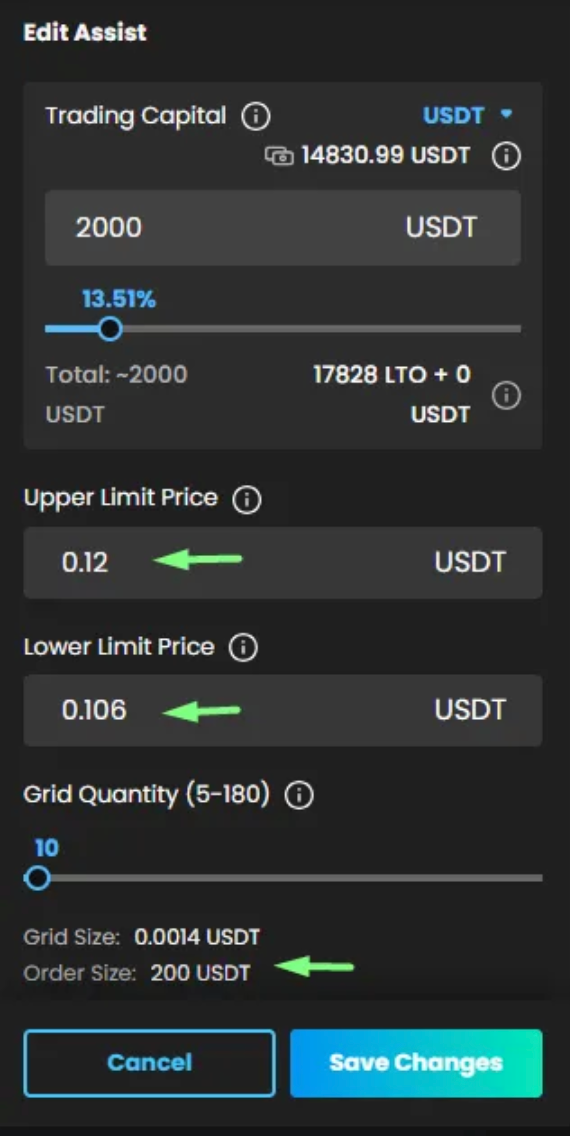
Trading Capital

2000USDT

Trading capital currency

USDT

Upper Limit Price

0.12

Lower Limit Price

0.106

Grid Quantity

10

Grid Size

0.0014 USDT

Order Size

200 USDT

Trailing up

enabled

Downward price protection

Disabled

Upper Stop price

disabled

Lower Stop price

disabled

Start Trigger Conditions

Instant

Stop trigger Conditions

Manual

Step 1. Click the Assist details of the running Grid

Step 2. Look for and click the "Edit" button

Step 3. Edit some of the fields as following

Setting

Value

Change to

Strategy

Bullish

Non-Editable Settings

Trading pair

LTO/USDT

Non-Editable Settings

Trading Capital

2000USDT

Leave as it is

Trading Capital Currency

USDT

Leave as it is

Upper Limit Price

0.12

0.11

Lower Limit Price

0.106

0.09

Grid Quantity

10

Leave as it is

Grid Size

0.0014 USDT

Automatically updated to after changing Upper and Lower Limit Price
- 0.002 USDT

Order Size

200 USDT

Remains the same since Trading Capital or Grid Quantity were not changed

Trailing up

enabled

Leave as it is

Downward price protection

Disabled

Leave as it is

Upper Stop price

disabled

Leave as it is

Lower Stop price

disabled

Leave as it is

Start Trigger Conditions

Instant

Leave as it is

Stop trigger Conditions

Manual

Leave as it is

BEFORE

AFTER

Step 4. Save updated settings by clicking “Save Changes” button

Step 5. On Balancing popup click “Proceed” button

After Editing:

When changes are saved

Parameter

Status After Edit

Grid Operation

- Continues operating with new parameters;
- All open orders have been cancelled;
- New orders have need created based on updated settings;
- Based on the updated settings Grid is now in Running state
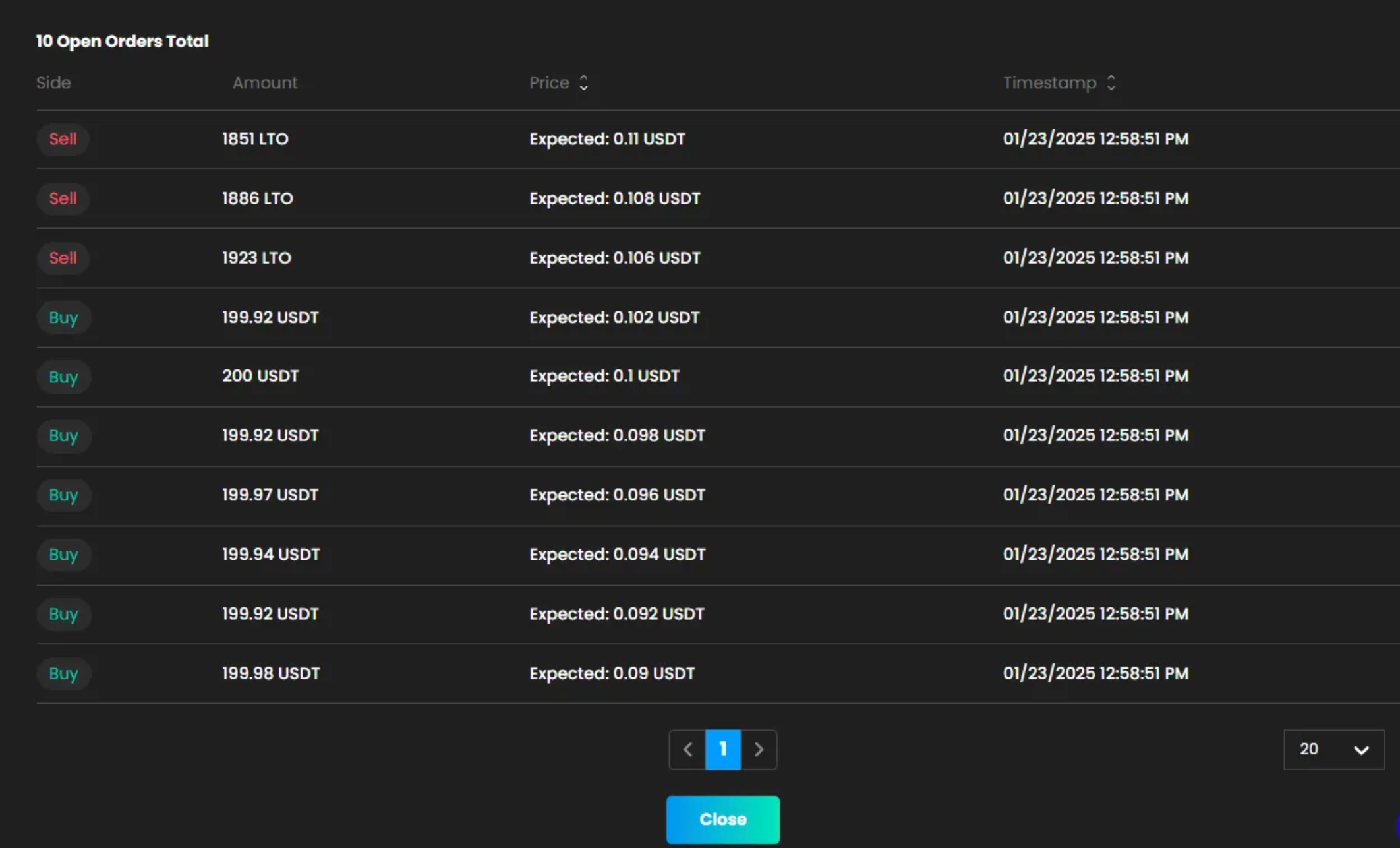
- In open orders you can see that New orders have different Grid Size (step between orders has been changed)

Realized Profit

Remains the same

Unrealized Profit

It is reset and is calculated based on newly created orders

Market Value

It is reset

Total PnL

It is reset

Trading Capital

It is updated

Reserved Funds

It is updated based on the newly created orders

General Info

Remains the same

BEFORE

  • Profit

  • Orders

AFTER

  • Profit

  • Orders

  • Events

💡 Note: Changes made to any of the fields below RESET profit statistic

  • Trading capital

  • Lower limit price

  • Upper limit price

  • Grid quantity

Case 6. Editing Grid with “Pending” status

User has a Grid AI assist in status “Pending” with the following settings:

Setting

Value

Strategy

Bullish

Trading pair

SAND/USDT

Trading Capital currency

USDT

Trading Capital

1000 USDT

Upper Limit Price

0.8

Lower Limit Price

0.5

Grid Quantity

10

Grid Size

0.03 USDT

Order Size

100 USDT

Trailing up

Enabled

Downward price protection

Enabled
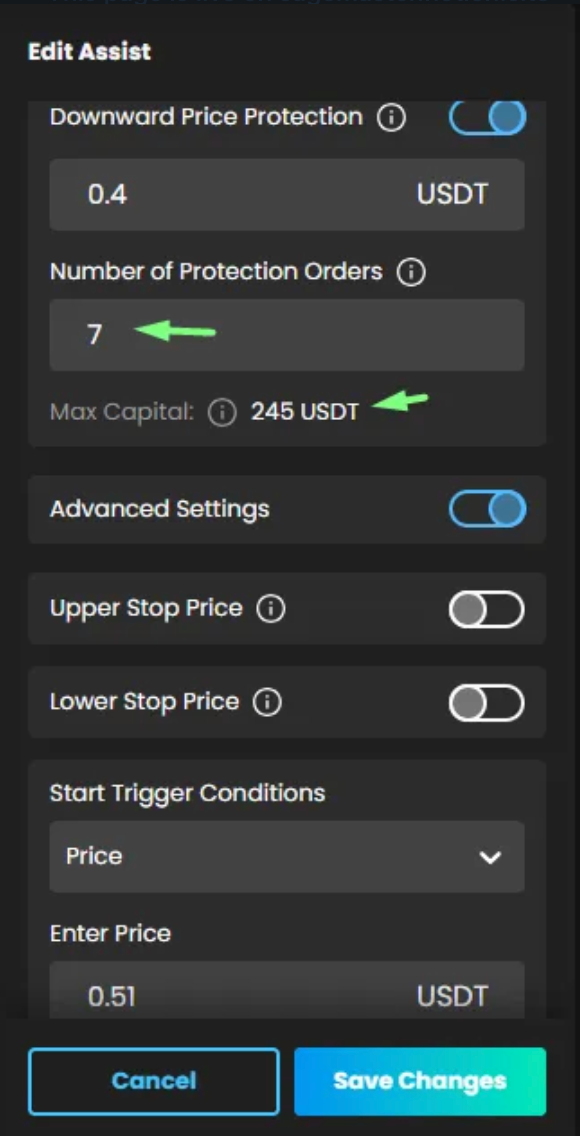
- DPP - 0.4
- Number of protection orders - 4
- Max Capital - 400 USDT (calculated automatically

Upper Stop price

Disabled

Lower Stop price

Disabled

Start Trigger Conditions

Price - 0.51 USDT

Stop trigger Conditions

Manual

Step 1. Click the Assist details of the Grid

Step 2. Look for and click the "Edit" button

Step 3. Edit some of the fields as following

Setting

Value

Change to

Strategy

Bullish

Non-Editable Settings

Trading pair

SAND/USDT

Non-Editable Settings

Trading Capital

USDT

Leave as it is

Trading Capital currency

1000 USDT

700 USDT

Upper Limit Price

0.8

Leave as it is

Lower Limit Price

0.5

Leave as it is

Grid Quantity

10

20

Grid Size

0.03 USDT

Updated automatically after user changing GRID quantity
0.015 USDT

Order Size

100 USDT

Updated automatically after user changing Trading Capital and GRID quantity
35 USDT

Trailing up

Enabled

Leave as it is

Downward price protection

Enabled
- DPP - 0.4
- Number of protection orders - 4
- Max Capital - 400 USDT (calculated automatically

Automatically updated after changing Trading Capital and GRID quantity and as result Grid size and Order size were updated
-
DPP - 0.4 (wasn’t changed)
- Number of protection orders - 7
- Max Capital - 245 USDT (calculated automatically

Upper Stop price

Disabled

Leave as it is

Lower Stop price

Disabled

Leave as it is

Start Trigger Conditions

Price - 0.51 USDT

Leave as it is

Stop trigger Conditions

Manual

Leave as it is

BEFORE

AFTER

Step 4. Save updated settings by clicking “Save Changes” button

After Editing:

When changes are saved

Parameter

Status After Edit

Grid Operation

Changes are saved but no orders are placed since the Grid is still in Pending status

Realized Profit

Remains the same

Unrealized Profit

Remains the same

Market Value

Remains the same

Total PnL

Remains the same

Trading Capital

It is updated with new values

Reserved Funds

Remains the same

General Info

Remains the same

Note: Changes made to any of the fields DO NOT reset profit statistic since the Grid is in Pending status

💡 Once you click the "Start" button or the price trigger level is reached, the Grid will begin operating with the newly saved parameters. The Realized profit, Unrealized profit, Market value, and Total PnL will be calculated based on new settings.

BEFORE

AFTER

Case 7. Editing Stopped Grid

User has a stopped Grid AI assist with the following settings:

Setting

Value

Strategy

Bullish

Trading pair

RSR/USDT

Trading Capital currency

USDT

Trading Capital

1000 USDT

Upper Limit Price

0.013975

Lower Limit Price

0.01118

Grid Quantity

5

Grid Size

4.56%

Order Size

200 USDT

Trailing up

enabled

Downward price protection

disabled

Upper Stop price

disabled

Lower Stop price

disabled

Start Trigger Conditions

Instant

Stop trigger Conditions

Manual

Step 1. Click the Assist details of the running Grid

Step 2. Look for and click the "Edit" button

Step 3. Edit some of the fields as following

Setting

Value

Change to

Strategy

Bullish

Non-Editable Settings

Trading pair

RSR/USDT

Non-Editable Settings

Trading Capital

1000 USDT

487 USDT/1000 RSR

Trading Capital currency

USDT

USDT/RSR

Upper Limit Price

0.013975

0.015

Lower Limit Price

0.01118

0.01

Grid Quantity

5

-

Grid Size

4.56%

Updated automatically after user changes Grid Upper and Lower Limit price
8.45%

Order Size

200 USDT

Updated automatically after user changes Trading Capital
100.02 USDT

Trailing up

enabled

disable

Downward price protection

disabled

Leave as it is

Upper Stop price

disabled

Leave as it is

Lower Stop price

disabled

Leave as it is

Start Trigger Conditions

Instant

Leave as it is

Stop trigger Conditions

Manual

Leave as it is

BEFORE

AFTER

Step 4. Save updated settings by clicking “Save Changes” button

After Editing:

When changes are saved

Parameter

Status After Edit

Grid Operation

Changes are saved but no orders are placed since the Grid is still in Stopped state

Realized Profit

Remains the same

Unrealized Profit

Remains the same

Market Value

It is reset to 0

Total PnL

Remains the same

Trading Capital

It is updated with new values

Reserved Funds

Remains the same

General Info

Remains the same

Note: Changes made to any of the fields DO NOT reset profit statistic since the Grid is in Stopped status

💡 Once you click the "Start" button, the Grid will begin operating with the newly saved parameters. The Realized profit, Unrealized profit, Market value, and Total PnL will reset when the Grid starts.

BEFORE

AFTER

Case 8. Editing with “Running!” status

User has a running Grid AI assist with the following settings:

Setting

Value

Strategy

Bearish

Trading pair

GALA/USDT

Trading Capital

1000 USDT/1000 GALA

Trading Capital currency

USDT/GALA

Upper Limit Price

0.0267

Lower Limit Price

0.02438

Grid Quantity

5

Grid Size

0.000464 USDT

Order Size

7389.07 GALA

Trailing down

Enabled

Upward price protection

Enabled
- Upward Price Protection - 0.03041
- Number of Protection Orders - 8( Max capital - 59112.56 GALA)

Upper Stop price

disabled

Lower Stop price

disabled

Start Trigger Conditions

Instant

Stop trigger Conditions

Manual

Step 1. Click the Assist details of the running Grid

Step 2. Look for and click the "Edit" button

Step. 3. Edit some of the fields as following

Setting

Value

Change to

Strategy

Bearish

Non-Editable Settings

Trading pair

GALA/USDT

Leave as it is

Trading Capital

1000 USDT/1000 GALA

Leave as it is

Trading capital currency

USDT/GALA

Leave as it is

Upper Limit Price

0.0267

380

Lower Limit Price

0.02438

Leave as it is

Grid Quantity

5

Leave as it is

Grid Size

0.000464 USDT

Automatically updated to after changing Upper and Lower Limit Price
- 0.002 USDT

Order Size

7389.07 GALA

Automatically updated to after changing Upper and Lower Limit Price
- 7407.21 GALA

Trailing up

Enabled

Leave as it is

Downward price protection

Enabled
- Upward Price Protection - 0.03041
- Number of Protection Orders - 8( Max capital - 59112.56 GALA)

Disable

Upper Stop price

disabled

Leave as it is

Lower Stop price

disabled

Leave as it is

Start Trigger Conditions

Instant

Leave as it is

Stop trigger Conditions

Manual

Leave as it is

BEFORE

AFTER

Step 4. Save updated settings by clicking “Save Changes” button

Step 5. On Balancing popup click “Proceed” button

After Editing:

When changes are saved

Parameter

Status After Edit

Grid Operation

- Continues operating with new parameters;
- All open orders have been cancelled;
- New orders have need created based on updated settings;
- Grid AI Assist status changed from Running! to Running ;
- In open orders you can see that New orders have different Order size and Grid Size (step between orders has been changed)

Realized Profit

Remains the same

Unrealized Profit

It is reset and is calculated based on newly created orders

Market Value

It is reset

Total PnL

It is reset

Trading Capital

It is updated

Reserved Funds

It is updated based on the newly created orders

General Info

Remains the same

BEFORE

  • Profit

  • Orders

AFTER

  • Profit

  • Orders

  • Events

💡 Note: Changes made to any of the fields below RESET profit statistic

  • Trading capital

  • Lower limit price

  • Upper limit price

  • Grid quantity

Disclaimer: Trading involves significant financial risk and can result in substantial losses. Past performance does not guarantee future results. SageMaster does not provide financial advice. Users should ensure compliance with local regulations.