Automated Exits in Omni Assist — Take Profit & Stop Loss Toolkit
Promise: Automate exits to help capture gains and limit losses — so you don’t have to watch charts constantly. If you’ve ever watched a green trade drift back to zero or woken up to a deeper loss than you planned, this guide is for you. Omni Assist’s Take Profit & Stop Loss toolkit turns those “I should’ve closed” moments into clear, pre-set decisions your automation can carry out for you. You decide the rules. Omni does the watching.
Written By Ehsaan XP
Last updated 4 months ago
Who This Is For
Risk‑disciplined traders who want planned, emotion‑free exits. Also great for newer users who prefer peace of mind: simple targets for taking money off the table and safety nets to stop the bleeding.
What you’ll get from this guide
A friendly Quickstart so you can protect an Assist right away.
Plain‑English explanations of each exit tool, with tiny math you can sanity‑check.
Ready‑to‑use “recipes” by trading style.
Four realistic, hypothetical walkthroughs so the rules “click” quickly.
Clear behavior in odd situations (gaps, partial fills, downtime) and how to verify what happened.
Before You Start — Set Expectations
This feature helps you plan exits. It can’t guarantee a specific price or eliminate risk. Prices move. Liquidity and fees matter. Exchanges sometimes throttle or go into maintenance. You’ll see how we handle those moments, and how to check the trigger log when a rule fires.
Important: Examples in this guide are hypothetical and for education only. Results vary with market conditions. Automation can assist with exits but does not remove risk.
Five‑Minute Quickstart — One Safe Automation Right Now
Let’s get a sensible safety plan on any active Omni Assist.
Open your Omni Assist and go to Take Profit and Stop Loss Controls.
Turn on Stop Loss % and set
10.0%. Choose Action: Sell.Tip: Enter a positive number. The system interprets it as your maximum loss threshold.
Turn on Take Profit % and set
8.0%. Choose Action: Sell.Turn on Profit Timeout and set
48 hwith Min Profit0%. Choose Action: Sell.Save. You’ll see a confirmation and active badges on the Assist.
Why this works
You’ve defined a clear plan: take wins around 8%, cap losses around 10%, and if nothing happens in two days, exit on the first non‑negative tick to free capital. No babysitting.
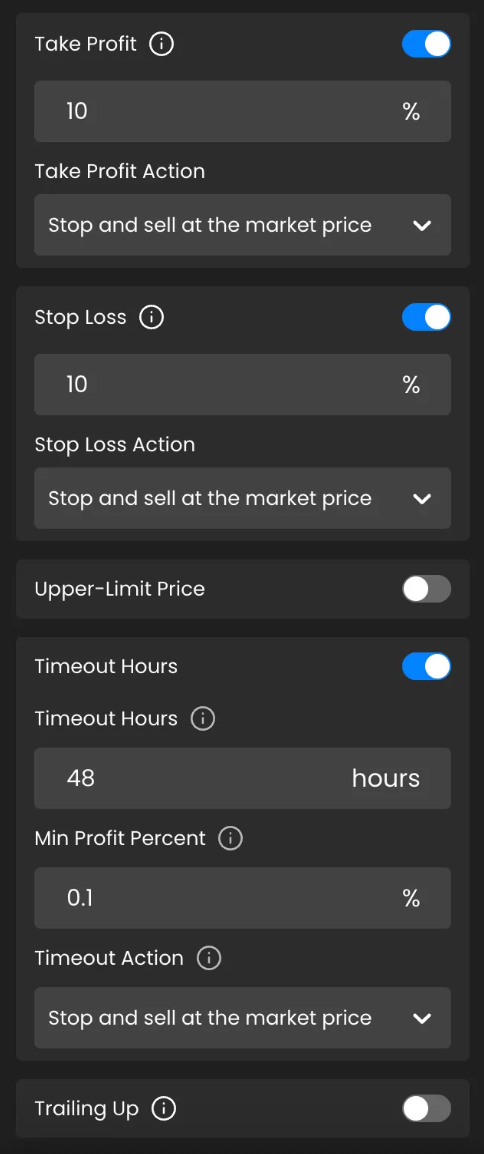
Reminder: Hypothetical configuration shown for learning. Your settings should reflect your risk tolerance and the asset’s volatility.
Meet Your Four Exit Tools — What They Do and When To Use Them
We’ll keep it conversational and practical. Each tool includes intent, trigger, when to use it, and what to watch out for.
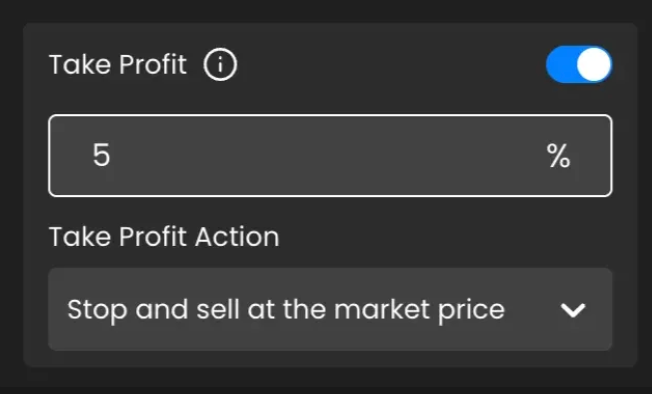
Take Profit by Percentage
In plain English: “If I’m up by this much overall, close it.”
Trigger: Total Profit % ≥ your TP%.
Total Profit % = (Realised P&L + Unrealised P&L) / Initial Capital × 100.
Great for: Momentum or mean‑reversion trades where profit windows can be short.
Watch out for: A too‑low target clips winners; too high can miss the moment.
Tiny example: Start with 1,000 USDT. Realised +30, Unrealised +20 →
(30+20)/1000 × 100 = 5%.If TP is 5%, the rule fires.
Stop Loss by Percentage
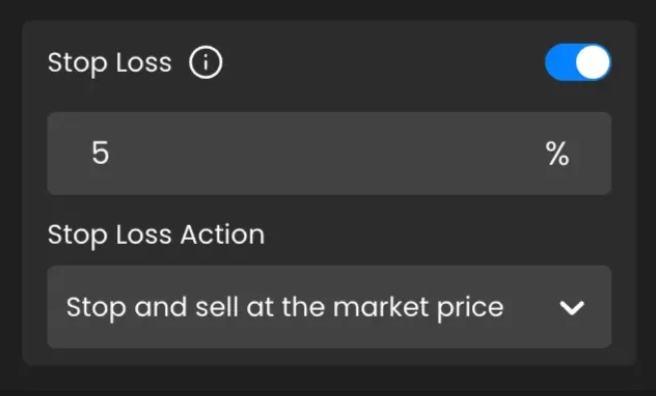
In plain English: “If total loss reaches this level, pull the plug.”
Trigger: Total Loss % ≥ your SL%. Loss is treated as a positive number for comparison.
Great for: Sleep hours, busy workdays, or any hard risk limit.
Watch out for: An SL far larger than TP leads to weak risk‑to‑reward. Omni will nudge you with a gentle warning.
Take Profit by Upper ‑ Limit Price

In plain English: “If the market prints this price, I’m out.”
Trigger for longs: Mark Price ≥ your upper‑limit.
Trigger for shorts: Mark Price ≤ your upper‑limit.
Great for: Price‑target theses (for example, “I’ll exit ETH near $3,800”).
Validation: For longs, your upper‑limit must be at or above current mark; for shorts, at or below. If you see a validation message, nudge the level accordingly.
Profit Timeout

In plain English: “After this many hours, take profit on the first non‑negative tick (or once Min Profit is met).”
Trigger: When running time ≥ timeout, Omni checks every tick:
If Total Profit % ≥ Min Profit %, close now; if you’re negative, wait for breakeven or better.
Great for: Capital efficiency and avoiding “zombie” assists.
Watch out for: Don’t set Min Profit above your TP%; that can stall exits.
Action types you can choose
Sell: Close the position and convert base → quote. Recommended for most users.
Stop: Cancel orders but leave assets as they are. Useful if you plan to manage exposure manually.
How The Rules Work Together — A Simple Flow You Can Picture
Every tick, Omni follows the same order. Think of it like a series of traffic lights.
Take Profit % reached? If yes, close.
Stop Loss % reached? If yes, close.
Upper‑Limit reached? If yes, close.
Timeout window open? If yes, Min Profit met?
If yes, close; if not, keep waiting for breakeven or better.
When any rule fires, the Assist enters CLOSING. Other rules pause until the exit completes.
Latency note: The engine evaluates continuously against live prices. Routing speed depends on exchange latency, liquidity, and rate limits.
Choose Your Recipe — Friendly Starting Points by Style
These are not hard rules; they’re calm starting points you can adapt to asset behavior.
Momentum — 1 to 48 hours
TP 6–10%, SL 6–10%, Timeout 48 h, Min Profit 0%, Action Sell.
Swing — days to weeks
Deep SL 15–25% as a catastrophe net + Upper‑Limit at your thesis resistance; optional modest TP.
Capital rotation — free stuck funds
Timeout 24–72 h, Min Profit 0–1%, optional TP 4–8%.
Price thesis — target a level
Upper‑Limit at your target; add a deep SL for tail risk.
Safety hint: If your SL% is larger than TP%, consider lifting TP or lowering SL to keep a healthier risk‑to‑reward.
Case Studies — Walkthroughs With Real Numbers
Each scenario is a hypothetical example to teach the rule’s behavior. It’s not a promise of results.
Signal‑Driven Profit Capture — SOL/USDT
Setup: TP 6%, Action Sell.
Story: You catch a breakout. Momentum carries to +6.3%. TP fires, status flips to CLOSING, fills complete. In this example, the rule routed automatically during inactive hours, as configured.
Takeaway: Total Profit % looks at realised + unrealised P&L to decide.
Overnight Bad‑News Guard — BTC/USDT
Setup: SL 20%, Action Sell.
Story: A late headline shocks the market. Mark reaches −20.4%. SL fires and exits. It wasn’t fun, but it was bounded — and that’s the point.
Takeaway: A deep SL prevents a single event from erasing weeks of gains.
Price‑Target Thesis — ETH/USDT at 3,800
Setup: Upper‑Limit 3,800, Action Sell.
Story: Price grinds higher, tags 3,801, rule fires, and you’re out near your level. No manual limit orders. No watching.
Takeaway: Upper‑Limit plays nicely with grid accumulation and thesis exits.
Stagnant‑Market Timeout — DOGE/USDT
Setup: Timeout 48 h, Min Profit 0%, Action Sell.
Story: Rangebound for two days. The next tiny uptick is +0.3% — enough to meet the rule. Exit completes, capital is free to hunt better setups.
Takeaway: Timeout gently cashes you out once the window opens.
Note: These are hypothetical illustrations. Actual trade outcomes vary with liquidity, spreads, fees, volatility, and exchange conditions.
Edge‑Case Behavior — Plain‑English Answers for Weird Days
Gaps and flash moves: If price jumps past your boundary, the rule still fires. Fills happen at the next best routable price, which can be above or below your exact level.
Partial fills: Large exits may complete in chunks. The Assist remains CLOSING until done.
Latency and rate limits: Orders are queued immediately; if an exchange throttles requests, Omni automatically retries. Check the trigger log for details.
Maintenance windows: If an exchange is down, the exit is deferred. The Assist stays CLOSING and resumes once endpoints are back.
Mark vs last trade: We use Mark Price to reduce manipulation risk and keep behavior consistent.
Verify and Learn — Build Trust in Your Automation
Trigger log: See rule name, your inputs, timestamp, mark price at fire, order IDs, and fill summary.
Notifications: Instant push or email when a rule fires and when the exit completes.
Recompute Total Profit % yourself:
(Realised + Unrealised) / Initial Capital × 100.
Tip: If your ledger shows numbers net of fees, include fees in your check or expect small differences.
Safe Defaults and Gentle Guardrails — Micro‑copy You Can Reuse
“Heads‑up: Your SL% is greater than TP%. This may weaken your risk‑to‑reward. Consider raising TP% or lowering SL%.”
“Timeout tip: Try 0–1% as Min Profit to exit smoothly; higher values can delay the close.”
“Action choice: Sell exits to quote immediately. Stop cancels orders and keeps assets as‑is for manual management.”
“Upper‑Limit validation: For longs, set at or above current mark; for shorts, at or below.”
Simple KPIs That Tell You It’s Working
Automation close‑rate: What percent of exits are handled by rules (aim: rising after you enable them).
Max drawdown per Assist: Compare before vs after turning on SL%.
Capital velocity: Average time‑in‑assist (often drops when Timeout is active).
Risk‑to‑reward distribution: Are you clipping winners or letting losers run? Adjust TP/SL accordingly.
Troubleshooting and FAQs
I typed “−10%” and the field turned red.
Enter a positive number like 10%. The system interprets it as your maximum loss threshold.
My TP% didn’t fill exactly at the target.
Rules check the mark price. Routing fills at the next best price given liquidity, spreads, and fees. The trigger log shows when the rule fired.
Upper‑Limit was rejected when I set it.
For longs, upper‑limit must be at or above current mark; for shorts, at or below.
If two rules are true at once, which wins?
Order per tick is TP% → SL% → Upper‑Limit → Profit Timeout. The first true condition fires. Status becomes CLOSING; other rules pause.
Sell or Stop — which should I pick?
Most users choose Sell for a clean exit to quote. Pick Stop only if you plan to manage the remaining assets yourself and accept price risk.
Glossary You’ll Actually Use
Mark Price: A fair‑value reference price that dampens manipulation.
Realised / Unrealised P&L: Closed vs open profit or loss. Both count toward Total Profit % for triggers.
Initial Capital: The capital you allocated to the Assist at the start.
Total Profit %: (Realised + Unrealised) / Initial Capital × 100.
Debounce: Prevents multiple rules from firing at once; only the first match proceeds.
CLOSING: The Assist has fired a rule and is exiting; other rules pause until completion.
Compliance Note — Risk Disclosure
This content is educational and not investment advice. Trading involves risk. Automation can assist with exits but does not eliminate risk. Routing prices may differ from targets due to liquidity, spreads, fees, and exchange delays or outages. Results vary and are not guaranteed.
Disclaimer: Trading involves significant financial risk and can result in substantial losses. Past performance does not guarantee future results. SageMaster does not provide financial advice. Users should ensure compliance with local regulations.