Security Features
After exploring SageMaster's trading strategies and analytical tools, it's essential to understand how to keep your account secure and properly manage your exchange connections. This section focuses on the critical aspects of protecting your assets and optimizing your exchange integrations for seamless trading.
Written By Ehsaan XP
Last updated 4 months ago
Account Protection Best Practices
Protecting your SageMaster account and associated exchange accounts is crucial when trading digital assets. Follow these best practices to secure your investments:
Strong Password Practices
Create unique passwords: Use a different strong password for SageMaster and each exchange
Length and complexity: Aim for at least 12 characters with a mix of uppercase, lowercase, numbers, and symbols
Avoid personal information: Don't use birthdays, names, or other easily guessable information
Update regularly: Change your passwords every 3-6 months
Consider a password manager: Tools like LastPass, 1Password, or Bitwarden can help generate and store strong passwords
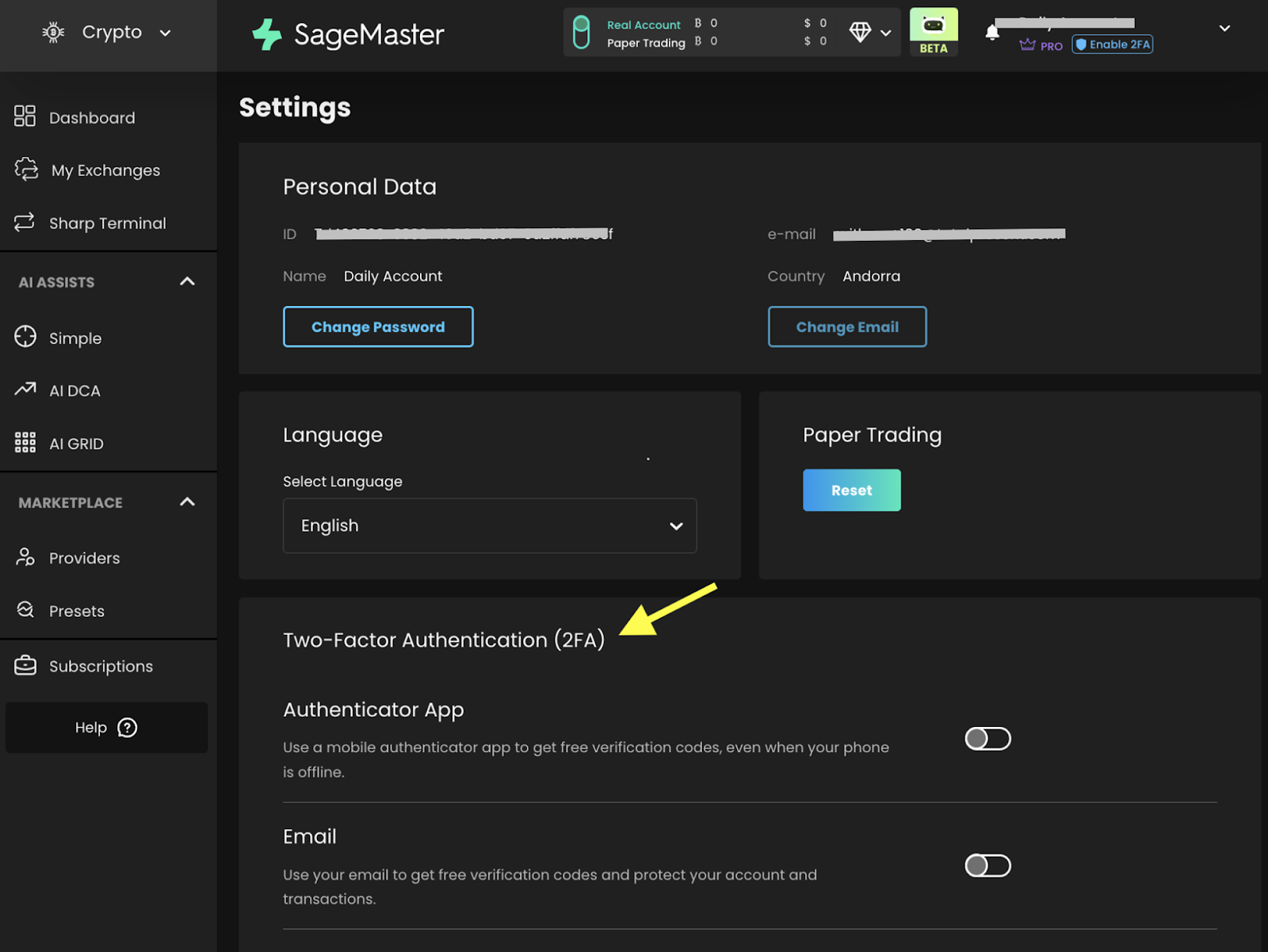
Enable Two-Factor Authentication (2FA)
Always enable 2FA on both SageMaster and your connected exchanges
Use authenticator apps (like Google Authenticator or Authy) instead of SMS where possible
Store backup codes in a secure location
For detailed 2FA setup instructions, see our 2FA Setup Guide
API Key Security
Never share your API keys with anyone
Only grant the necessary permissions (read-only when possible)
Enable IP restrictions when available
Regularly audit and rotate your API keys
For more information, review our API Key Management Guide
Device Security
Keep your operating system and browsers updated
Use antivirus/anti-malware software and keep it updated
Be cautious when using public Wi-Fi networks (consider a VPN)
Lock your devices when not in use
Only download trading applications from official sources
Phishing Prevention
Always verify website URLs before entering credentials
SageMaster will never ask for your private keys or exchange API secrets
Be suspicious of emails requesting account information
Check for SSL certificates (https://) before logging in
Bookmark official sites instead of using links from emails
Account Monitoring
Regularly review account activity and trading history
Enable notifications for account logins and transactions
Report suspicious activity immediately
Periodically audit connected applications and API keys
Recovery Options
Set up account recovery options (email, phone)
Store backup codes for 2FA in a secure, offline location
Consider using a hardware wallet for long-term crypto storage
Document your recovery processes in a secure location
2FA Setup Guide
Two-factor authentication adds an essential extra layer of security to your SageMaster account:
Navigate to Settings: Find the 2FA option in your account settings
Choose your 2FA method:
Email: Receive codes via your registered email
Authenticator app: Generate codes on your mobile device
Setting up Email 2FA:
Select the email option
Verify your email address
You'll receive a verification code each time you log in
Setting up Authenticator App 2FA:
Download a compatible authenticator app (Google Authenticator, Authy, etc.)
Scan the provided QR code with your app
Enter the generated code to complete setup
Default 2FA Method: Set your preferred method as default
Backup Codes: Save your backup codes in a secure location
Recovery Process: If you lose access to your 2FA device:
Use your backup codes
Contact support with account verification details
More info - Setting Up 2FA
API Key Management
Managing your exchange API keys appropriately is important for maintaining security in trading:
Creating Secure API Keys
Create separate API keys for different purposes (trading, monitoring)
Use descriptive labels to identify keys easily
Only enable necessary permissions (avoid withdrawal permissions if not needed)
Use IP restrictions when possible to limit access to specific locations
API Key Permissions Guide
Different permission levels serve different purposes:
Read-only: Best for portfolio tracking and monitoring
Trading: Required for routing trades via SageMaster
Withdrawal: Typically not needed for automated trading (highest risk)
Monitoring and Rotating API Keys
Regularly review active API keys
Rotate keys every 3-6 months
Immediately revoke any keys you suspect may be compromised
Document which platforms use which keys
Exchange-Specific API Security Features
Many exchanges offer additional security features:
IP whitelisting: Limit API access to specific IP addresses
Key restrictions: Limit trading to specific pairs
Time-based restrictions: Set keys to expire after a certain period
Trading limits: Set maximum order sizes
Troubleshooting API Connections
Common issues with API connections include:
Incorrect API key or secret entry
Insufficient permissions
IP restriction conflicts
Exchange maintenance or outages
"Security is not a product, but a process." - Bruce Schneier
Happy Trading,
The SageMaster Team
Disclaimer: Trading involves significant financial risk and can result in substantial losses. Past performance does not guarantee future results. SageMaster does not provide financial advice. Users should ensure compliance with local regulations.