AI Grid Trading Guide: Proven Strategy for Maximum Profits
💡 Disclaimer: Please note that trading information outlined in this document should not be regarded as financial or investment advice from SageMaster. You should fully understand the features and use it at your discretion.
Written By Ehsaan XP
Last updated 4 months ago
👁️ What is AI Grid Spot Trading and how it works?
The AI Grid Trading Assist is a structured tool designed to help users analyze market movements in the volatile crypto market. SageMaster AI helps reduce emotional decision-making by providing data-driven insights as prices fluctuate. The Assist will simulate periodic buy and sell levels within a set Price Range, allowing you to observe potential outcomes around the clock.

For example, you can set buy orders at $300 below the current market price of ETH and sell orders at $300 above its current market price. The AI Grid trading Assist buys when the price drops to the specified level and again if the price falls further. The same happens in reverse when the price of ETH starts to rise.

The AI Grid analyzes small price changes using quantitative models. Consequently, it helps you make data-informed decisions and avoid FOMO (Fear of Missing Out), thanks to the SageMaster AI Grid Assist.

🤖 How do I configure AI Grid Assist on SageMaster?
There are two main ways to setup AI Grid on SageMaster:
AI Mode - Best suited for beginners! Automatically finds the best Grid settings to apply
Manual Mode - you will have to fill all the parameters manually
📊 Setting up Grid in AI Mode
This tutorial shows you how to setup Grid in AI Mode
Login to your SageMaster account at sagemaster.io
Click on AI Grid from the left navigation panel

Select one of the AI Grid strategies: Bullish Grid: Profit from price fluctuations within the grid as a market rises or Bearish Grid: Profit from price fluctuations within the grid as a market falls.

Select an exchange and currency pair of your choice you wish to Grid trade
Select “AI Setup”

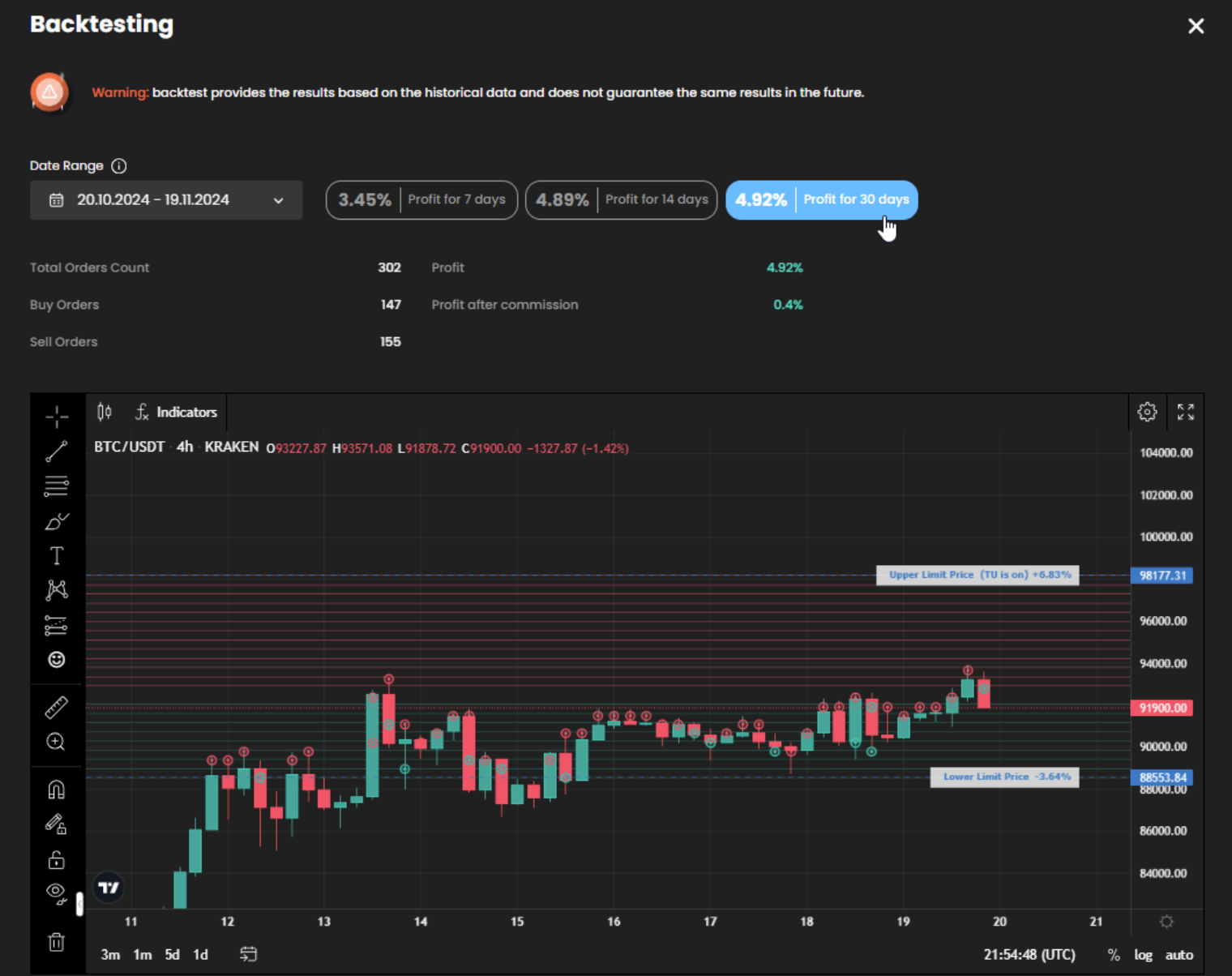
Click on the "Backtest" navigatio highlighted in the below screenshot to open the backtesting window. Once the window is open you can see the breakdown of the backtested results.


Select the Trading Capital currency / amount
Select the currency for your trading and the amount you wish to invest. The currency can be either Quote or both, Quote and Base. By default, the Quote currency is chosen as the Trading capital currency.

Click 'Continue' to preview the AI-configured settings, then click 'Create Grid' to begin your Grid simulation.

AI Grid may prompt users to add a specific amount of funds in either their quote or base currency. SageMaster will then create market orders to ensure that there are sufficient funds in the wallet to enable trading activities to take place.

Upon setting up the AI Grid, you will see Assist Details on the right side of the Grid, where you can track real-time portfolio stats, view order histories, profits, and view all your transactions.

Now you are all set! 🤩 You can allow your AI Grid to run over time to monitor and analyze simulated strategy behavior under different market conditions.
Ideally, you should run the AI Grid Assist for an extended period of time (30 days+) in order to see reasonable profits accumulate.
You can stop the AI Grid Assist at any time; it will then give you a few different options to choose from, as displayed in the screenshot below:

🗿 Setting up Grid via Manual mode
Note: It is recommended that you read the ‘Tips - best practices’ section when manually setting up Grid Assist to achieve the best results.
Grid Settings
Select your exchange
Select your choice of trading pair to trade
Select your desired Trading Capital currency
Enter the Trading capital amount
Please note that minimum Investment size is determined by the number of grid and price range. More number of grid lines bigger the Trading capital size is required to be able to evenly distribute orders across the grid.

Grid Conditions
Enter the Upper & Lower price range
Upper Limit: The highest price that you expect
Lower Limit: The lowest price that you expect
Select Grid Mode; Geometric or Arithmetic
Arithmetic - Each grid has equal price difference

Geometric - Each grid has price ratio difference.

Enter the grid quantity number
The number of limit orders placed within the price range is determined by the Grid quantity.
An increase in the Grid quantity results in an increase in the overall Trading Capital and exchange fees.
Additionally, you can view the backtest results to help you optimize the strategy results and further enhance them by manually tweaking your Grid conditions.
Select Start/Stop trigger options
Start Trigger Options: Set your Grid Assist to start based on a specific trigger, such as a price condition or a TradingView alert, or leave the default option “Instant” so that Grids starts placing orders immediately upon creation.
Stop Triggers: Similarly, define when your Grid Assist should stop, with options like manual control or TradingView alerts.


Enable Trailing Up/Down: Enable Trailing up for Bullish Grid and Trailing down for Bearish Grid, capturing the momentum of rising or falling markets for continuous profit.
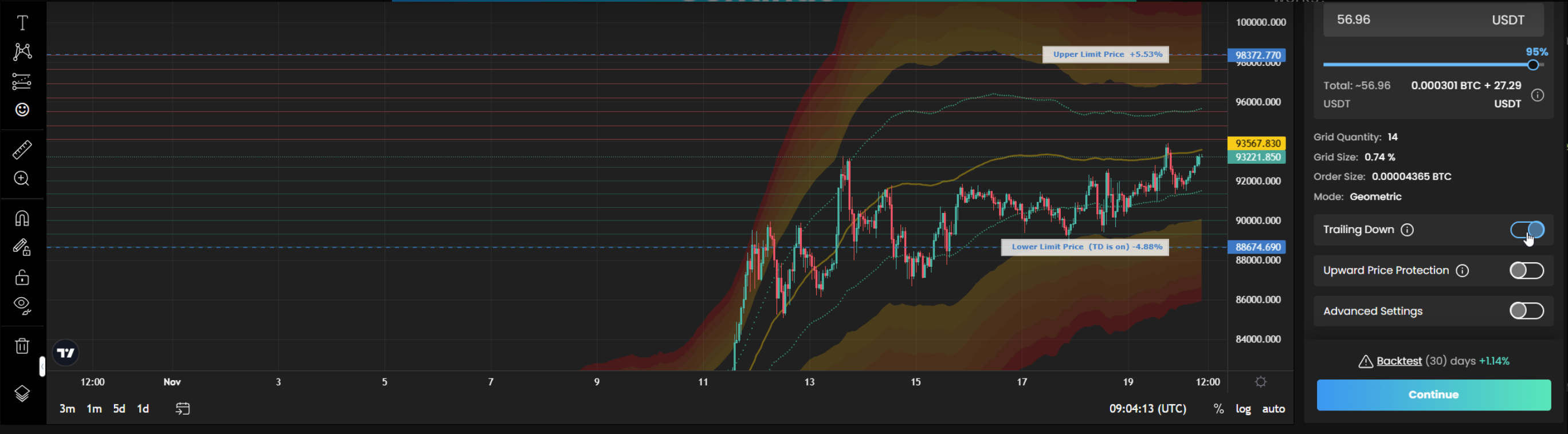
Enable Downward price protection for the Bullish Grid or Upward price protection for the Bearish Grid:
Both DPP and UPP adjust to market conditions, managing order limits and alerting users to add funds when necessary
Once you have configured your Grid to your satisfaction, click the 'Create Grid' button to initiate the AI Grid Assist! Congratulations you have successfully setup the Grid AI assist manually!

💸 Quote vs Base
In the currency markets and on SageMaster, the base currency is the first currency listed in a currency pair, while the quote currency is the second. The value of the base currency is expressed in terms of the quote currency. For example, in the currency pair BTC/USDT, the base currency is BTC and the quote currency is USDT.

One of the reason USDT is called the Quote currency is because BTC is priced in terms of USDT, in other words BTC is quoted in terms of USDT. If you take a look at the order-book on SageMaster you will note that price of BTC is determined by USDT.

Consider another example, ADA/BTC. In this case, BTC acts as the Quote currency, and ADA as the Base currency. The value of ADA is therefore expressed in terms of BTC. The screenshot displays the order-book price of ADA in terms of Bitcoin, meaning that the prices are quoted not in terms of ADA, but in terms of the value of BTC.

💎 Tips - Best Practices
The AI option can be selected to automatically fill in parameters based on past success, making it easier for beginners. You can also manually set up the Grid strategy, and make further adjustments to ensure the best results. It is important to keep the following key concepts in mind when setting up the Grid, either via AI mode or manually:
Grid Parameters
# of Grids
Price Range
Sideway and Volatile Market
Crypto choice
Use an exchange sub account
Grid Parameters Matter
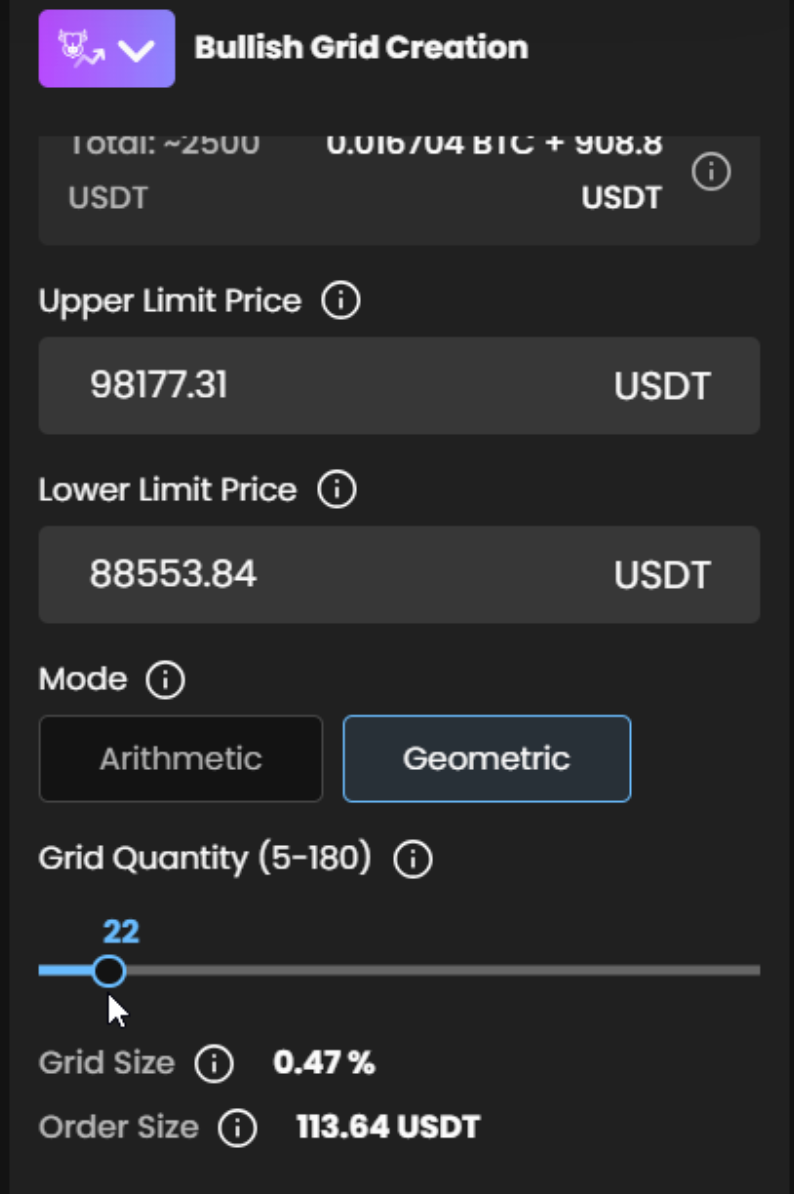
The number of grid size will influence your net profit and overall performance. You can set up 5 grid lines and establish BUY and SELL points at a distance of $100. However, this grid will not trade often and thus, will not generate frequent orders to generate profits out of the market in the short-term.


As seen in the screenshot below, anything that moves between the Red and Green line will not affect the grid level, hence trades will not be routed.

You should consider the difference between a small or large grid size to determine how many trades you want to route. This will affect the commission charged by the exchange. Establishing a good balance between trades and profits while minimizing exchange fees is key.
SageMaster provides a useful tool to help you find the settings you need. You can adjust the number of Grids on the Grid Condition settings to find a good balance. With this tool, you can maximize your profits and minimize exchange fees, and run backtests to establish commission fee vs net profit.
# of Grids is essential
Having a large number of grid lines can be beneficial in some cases, particularly if you have a large capital and don't mind smaller incremental daily profits. However, it is important to keep in mind that with a smaller distance between grid lines, trading fees can eat up your profits. It is beneficial to use the backtesting tool to identify a good balance between grid quantity and trading fees.
Price Range does matter
If the current trading price of BTC is 92K, but the lower and upper prices set in Grid Assist are 85K and 65K respectively, then Grid Assist will not place any orders and yield any profits. This is because the set range is lower than the current market price.
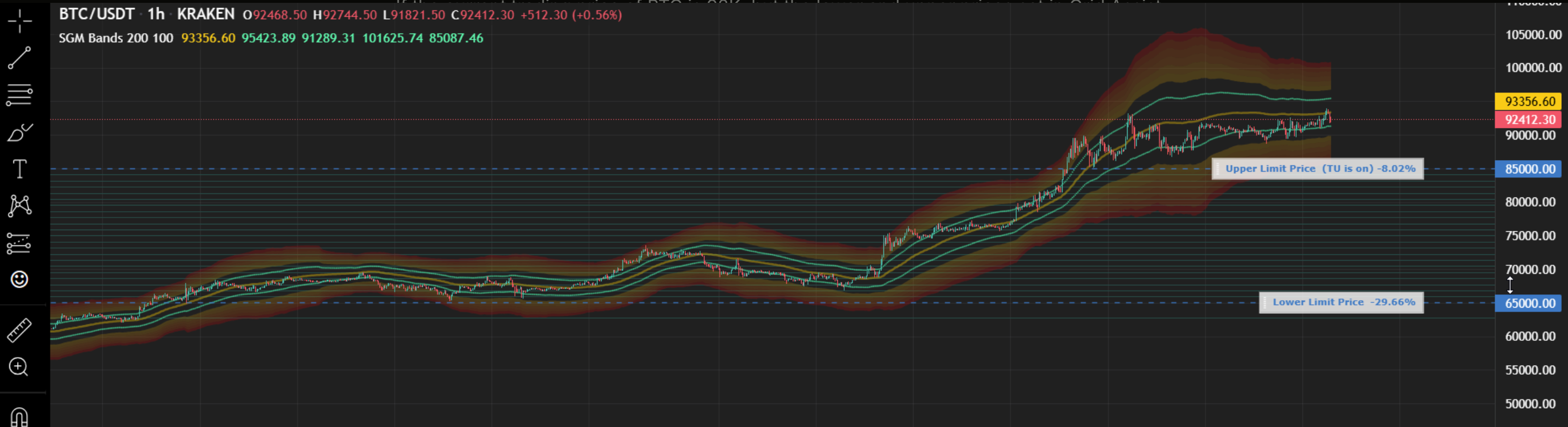
Therefore, by enabling Trailing Up/Down feature you may capture the momentum of rising or falling markets for continuous profit.
Sideway & Volatile Market Matters
Although our AI Grid utilizes advanced algorithms to identify and exploit opportunities in the market, enabling it to make profitable trades even in markets with little to no movement. It is able to capitalize on market swings and produce profitable results. However SageMaster AI Grid is most advantageous when trading in a market that is volatile or has sideways movement.
It can help to accumulate profits more frequently. To get the best results from a Grid strategy, it is useful to determine the price range beforehand.

Example: Examining the historical data of AVAX-USDT, it can be seen that since the recent bear market (2022), the currency has been fluctuating between 10.5 and 22.5 USDT. At the time of writing (January 2023), the price is at 20 USD.

As per above example, we can use our AI Grid within this price range (10.5 - 22.5), and the more regularly the price fluctuates within it, the more profit it will generate.

When looking to begin a Grid Assist, it is beneficial to assess historical market data and determine the range of volatility within the lower and upper band price. If the market is consistently trading within the same range, it may be a worthwhile pair to trade on.

The more regularly the price fluctuates within its range, the more profit it will generate.
Create exchange sub account for better reporting
To improve the clarity of reporting and ensure that funds used by the Grid Assist are separate from other trading activities, it is recommended to create a sub-account on your exchange or a new exchange account specifically for the Grid Assist. This will provide you with a clear overview of the profits generated and ensure the funds used by the Grid Assist are separate and easily distinguishable.
Crypto Choice & Choosing a pair
When choosing a cryptocurrency to trade on, it is not recommended to opt for alt-coins that are not among the top 100 liquid coins listed on coinmarketcap.com. This is because there is a market risk associated with such coins. Ideally, you want to ensure that the currency is either neutral or sustainable in the long-term. There is no one specific formula for selecting a potential trading pair, but there are some basic steps you can take to help you make an informed decision:
When visiting coinmarketcap.com, you can skim through the top 100 or 50 coins.
The top 100 coins are generally low risk.
Coins ranked between 100 and 250 are at moderate risk.
Coins 400 and above carry a much higher risk.
The coins listed on the first page of coinmarketcap typically have good liquidity, ranging from 300M to over a billion.
You can check the 7 days and 24 hours market fluctuations column to assess the level of volatility.
The higher the crypto's ranking on coinmarketcap, the safer it is to trade.
On SageMaster you can backtest your chosen crypto pair which you have identified on coinmarketcap.com
You can also visit site like Lunarcrush.com to give you a detail insight and pattern of cryptos that are trending.
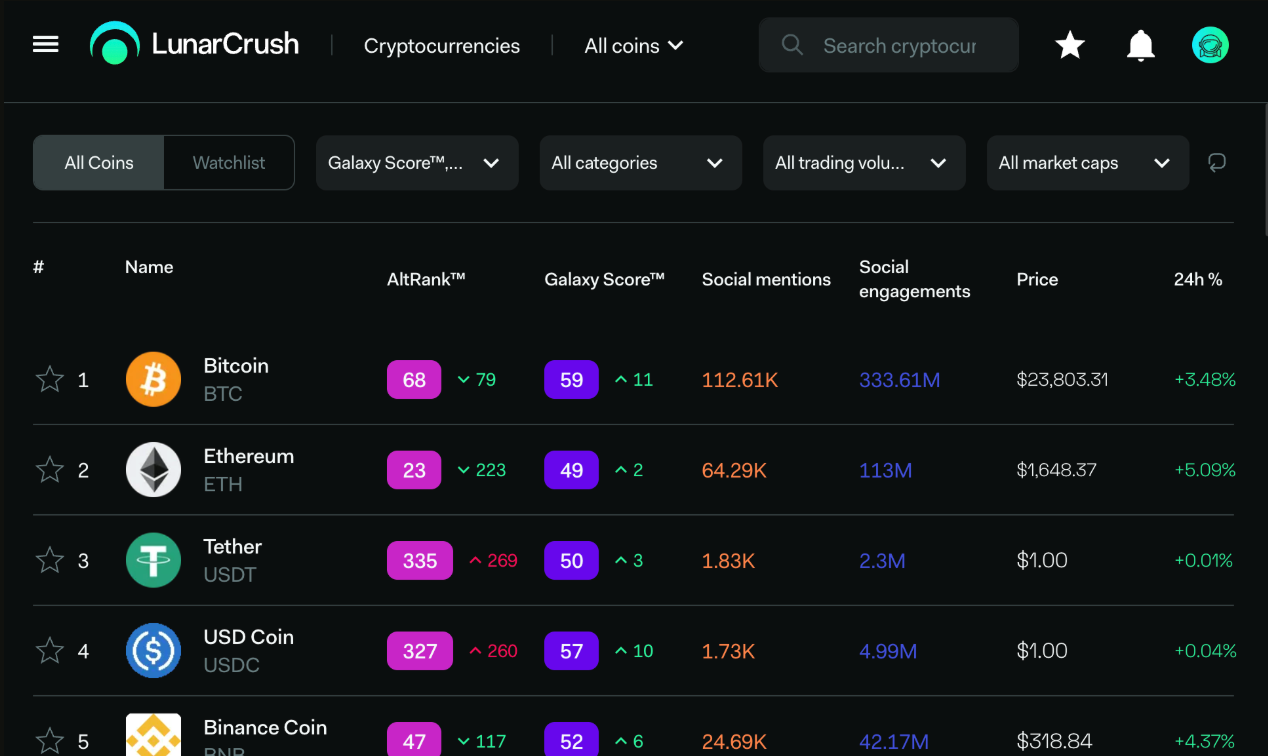
You can use SageMaster to backtest the crypto pair you have identified on coinmarketcap.com.
Sites such as Lunarcrush.com can provide a detailed insight into trending cryptos.
Additionally, you can use the trading chart on Sagemaster to view the range of prices the coin is trading at and its volatility consistency, as discussed in the "Sideway" section.
Finally, it is important to emphasize that, while SageMaster provides you with all these precise AI and smart features, it is even more important to stay educated and be ahead of the curve by attending our live stream trading and educational sessions on WoW. Our community of traders and educators has provided great value and impacted thousands of lives.
🏹 Parameters Explanation
Grid Settings Step
Grid Conditions step
Grid Backtesting
🚀 10 Reasons to Start Using It Today!
1. Low entry point
Using a AI Grid Assist, you can enter positions at levels you might not be able to achieve by trading manually. Without the need to continuously monitor price fluctuations, you can have orders at several low entry points. Conversely, you’ll also be placing orders to be routed at higher selling levels, or placing the trades at extreme levels.
2. Easy to use and customizable
The grid trading assist is straightforward to use and easily customizable. Once you sign up, you can configure the parameters as you wish. Generally, you can adjust the upper and lower limits of the price range, and set the number of orders the Assist can place within this price range, as well as the width between each buy-sell limit order.
Users don't need to know or calculate complex metrics and measurements, or study market indicators. Since it's “plug and play,” anyone without extensive crypto trading experience can set up a grid trading assist in seconds. The underlying grid strategy doesn’t require new traders to understand complex market signals, indicators, and algorithms.
3. High level of efficiency
SageMaster Assists lend themselves to a high level of efficiency. This is because the underlying trading strategy is highly logical. Assists are designed to perform predetermined tasks unrelated to the market sentiments and trends. AI trading Assist efficiently employs the Grid strategy, which would be too intricate to route with manual trading.
Since AI Grid trading Assist are easy to set up and use, they can be used in virtually any currency market. It’s a great starting point for traders who don’t plan to monitor the market constantly.
4. AI Grid turns strategies into profit during a quiet market
AI Grid trading Assist have the unique advantage of turning a profit in a time of market doldrums. Naturally because, cryptocurrencies have earned a reputation for volatility. But now and then, the markets trade in sideway and within a range, but at times it might still move wildly within that range. Rather than have your crypto assets hibernate along with the market, you can use AI Grid trading strategies to capitalize on a market where you may not have much conviction.
5. Enhance risk management
SageMaster Grid Assist can help you improve your risk management capabilities. The settings you configure will have an immediate effect on your profitability. Most notably, it gives you control over the risk-reward level.
You can make a small but consistent profit with minimal risks when you speculate on stablecoin pairs involving USD tether, for example. Alternatively, you can decide to take on more risk and aim for bigger stakes and greater returns, trading coins with low market cap and high volatility.
The ability of SageMaster Grid Assist to modify your risks according to your risk appetite is an excellent tool for enhancing your risk management techniques.
6. You are a liquidity provider
Using the AI Grid trading strategy via SageMaster Assist essentially means you provide much-needed liquidity for the exchange. You increase the market liquidity of the exchange by placing buy and sell orders, which makes grid trading an excellent strategy for market making. The Grid Assist can provide liquidity on a specific cryptocurrency by placing a bid-and-ask limit order on an exchange.
SageMaster Grid trading assist ensure you'll pay the maker fee as well because makers provide liquidity to an exchange by "creating or making a market" for other traders. In contrast, takers remove liquidity by “taking” available orders. Maker fees are usually lower to incentivize market makers. Since a grid trading strategy provides liquidity, users pay the lower maker fees.
Illiquid markets with thin order books (order books with fewer offers at different price levels, which increase slippage) tend to benefit from a grid trading strategy. They’re marked by large price spikes, which occur frequently. The grid trading Assist eats up these spikes by providing liquidity and converting them into profit for the trader. This also helps anyone trading the illiquid pair try to get a fair price.
7. Adaptability
SageMaster Assist can be used in any market, and with potential to make a profit. They’re adaptive — because the core underlying strategy relies on the idea of buying low and selling high (and pocketing the difference). This means that SageMaster Assist can trade successfully without being affected by market sentiments and trends.
You also have the freedom of customizing the Assist and selecting price ranges and the number of AI Grids, which helps you define the frequency and duration. You can modify the Assist for the short term, where it makes small profits by trading frequently in a short time frame. Or you can configure it to run for extended periods with less frequency, and gain profit from more considerable price changes.
8. Diversification
SageMaster Grid Assist can help you earn some extra profit if you intend to hold on to two exchangeable assets for the long haul. One of the primary tenets of investing is diversification, which is spreading your funds among multiple assets, rather than a single one. Rather than simply holding, you can earn extra profit by using the AI Grid trading strategy to make more money from the fluctuations between the prices of the multiple assets in your portfolio.
9. Optimal for both short-term and long-term trading
AI Grid trading as a strategy and other similar Grid styles that can be incorporated in other markets, such as forex. All kinds of traders — including scalpers, day traders, swing traders and position traders — can take advantage of SageMaster Assist for managing risk and maximizing profits.
Traders who prefer swift returns can configure the Assist to perform for the short term, capturing hundreds of trades from the minor price movements within a short period. Long-term traders can construct a considerable AI Grid range in which trades can run for a longer duration, ranging from weeks to months.
10. Take away emotions from trading
it can be hard to maintain control of unbridled emotions — such as anger, greed, and fear — when money is at stake when trading manually. SageMaster Assist can help enforce a rule-based Grid strategy, reducing the influence of emotions in trading.
Assists operate in line with a predefined set of rules, like fixed profit taking or stop-loss points. If you are aiming to route a consistent strategy, SageMaster Assist are beneficial for carrying out organized and constrained trades.
🌝 FAQ
What occurs when the market deviates from my Grid price range?
The Grid Assist will automatically pause and wait for the cryptocurrency to return within the grid's range, then resume trading. This is also an appropriate time to halt or remove the Grid Assist and reassess whether you want to continue using it or switch to a new range or cryptocurrency pair. All coins originally acquired by the Grid Assist when it was first initiated have already been sold.
What occurs when the price of the cryptocurrency falls below the bottom of the grid?
The Grid Assist will pause and wait for the cryptocurrency price to return within the grid's range before resuming trading. All of the initial funds used to start the Grid Assist are now invested in the altcoin being traded. This is a good time to evaluate whether you want to keep using the current Grid Assist or switch to a different range. If you believe that the cryptocurrency being traded may experience a further decrease in price, you might consider stopping the Grid Assist and implementing a Smart Cover trade to sell the cryptocurrency at its current market price and repurchase it at a lower price when it reaches a bottom, before setting up a new Grid Assist with a different trading range.
How does the AI determine the Upper and Lower Grid Levels?
The Upper and Lower Grid Levels are determined based on the selected backtest period, which can range from 7 to 30 days. The calculation takes into account the highest and lowest prices during this period, as well as other complex factors.
Can a Grid Assist be edited once it has been started?
Yes, you can edit the grids: add or remove
Can I compound gains or automatically reinvest profit back into the Grid Assist?
Not automatically, but if the Grid Assist is generating strong returns, you can opt to edit it every week or two and increase the amount of funds allocated per Grid Level. This feature will be available in 2024 Q4.
Do Grid Assist displayed profits include exchange fees?
Yes, fees are factored into the displayed profit statistics (the profit shown is NET).
Can I view a table of orders the Grid Assist has created on my exchange?
Yes, you can view it by clicking the Grid Assist name or number on the Grid Assist status display.
GRID Assist TIPS:
To improve the clarity of reporting and ensure that funds used by the Grid Assist are separate from other trading activities, it is recommended to create a sub-account on your exchange or a new exchange account specifically for the Grid Assist. This will provide you with a clear overview of the profits generated and ensure the funds used by the Grid Assist are separate and easily distinguishable.
In which currency I should have funds available on my exchange to use the Grid Assist?
The Binance Wallet you should use depends on the type of trading pairs you plan to trade with SageMaster.
If you are trading USDT pairs such as ETHUSDT, BTCUSDT, and ADAUSDT, it is recommended to keep funds available in your USDT wallet. On the other hand, if you are trading BTC pairs such as ETHBTC, AVAXBTC, and ADABTC, you should have funds available in your BTC wallet.
It is important to note that currently, SageMaster only allows you to invest from your Quote currency. For BTC pairs, BTC is your quote currency, and for USDT pairs, USDT is your quote currency.
🚦The Risks of AI Grid Assist
It is important to note that there are always risks associated with such trading strategies, especially in adverse market conditions. Sudden price spikes or drops can have an impact on your results. To minimize your investment risk, you can utilize either the Stop Loss or Trailing feature.
Despite these risks, AI grid is is one of the simplest and well-established trading approaches. Over the long term, it has the potential to produce substantial results. However, it can become less effective or even detrimental in cases of strong trend reversals. This highlights the importance of understanding when to create or discontinue your grid trading Assist.


Disclaimer: Trading involves significant financial risk and can result in substantial losses. Past performance does not guarantee future results. SageMaster does not provide financial advice. Users should ensure compliance with local regulations.