Minimum PnL
Disclaimer: Sagemaster, a software platform provides market insights on user-selected strategies. It does not offer financial advice or guarantee results. Trading involves risk, and users should consult financial professionals.
Written By Ehsaan XP
Last updated 4 months ago
🧠 About Minimum PnL
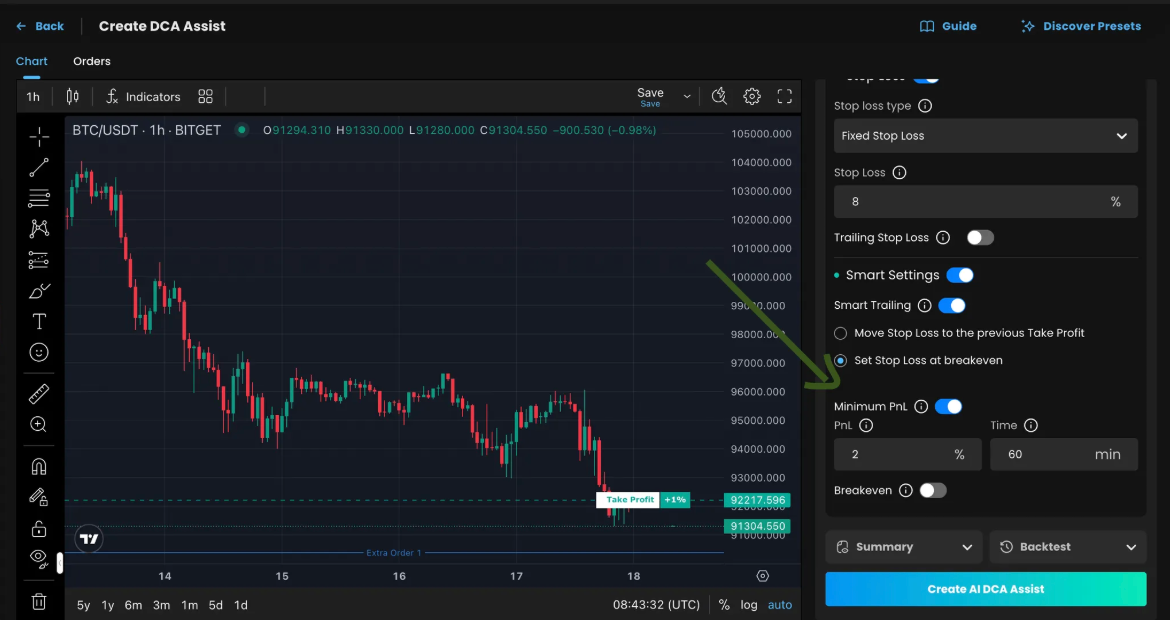
Minimum PnL allows traders to define a single take profit level that the system evaluates only after a specified time has passed. Rather than reacting instantly to price movement, this strategy checks the unrealized profit at a specific time, giving users a more structured and disciplined exit strategy.
🔍 How It Works:
The trade remains open until the defined time elapses.
Once that time is reached, the system checks the unrealized profit.
If the profit is equal to or greater than the set TP level, the trade will close automatically.
If the profit is below the TP level, the trade will remain open and follow your default closing logic (e.g., manual or other conditions). Trade will close when unrealized profit is equal to the time-base level
This approach is ideal for traders who want time-conditioned exits that avoid premature closures due to temporary price fluctuations.
🛠️ Setting Up Time-Based TP
Navigate to the “Smart settings” Section
Choose any Take Profit Type based on your strategy.
Enable "Smart Settings"
Turn On the “Minimum PnL” option.
A field will appear for defining your TP and time delay.
Configure the Settings
PnL: Enter your desired take profit target.
Time: Specify the number of minutes/hours after which the profit should be evaluated.
📈 Example
✅ Example 1: Minimum PnL in Action
TP: 2%
Time: 90 minutes
After 90 minutes, the system checks your unrealized profit:
If it's ≥ 2%, the trade closes automatically.
If it's < 2%, the trade remains open.
✅ Example 2: No Profit at Target Time
TP: 2%
Time: 30 minutes
30 minutes pass, but the profit is only 0.5%.
The system does not close the trade.
It will stay open and behave as per the TP logic or manual control.
📌 Use case: You want to close the trade only if the market moved in your favor by a minimum percentage — otherwise, you want to give it more time.
🌟 Benefits of Minimum P&L
🕒 Strategic Timing Control
Minimum PnL gives you the power to delay profit evaluation until a specific moment. This reduces the risk of closing a trade too early due to short-term price movements or temporary volatility.
✅ Why it matters: Trades often need time to develop. Waiting allows your strategy to breathe.
🧠 Smarter Decision Logic
Instead of acting on every tiny price move, this method checks whether the unrealized profit meets your goal only after a defined period.
✅ Why it matters: You avoid emotional or impulse-based exits by sticking to planned logic.
🎯 Cleaner Profit Target Validation
Minimum PnL ensures that profit targets are hit sustainably, not just during quick spikes or flash wicks.
✅ Why it matters: You reduce false TP triggers and close only when the market truly supports your goal.
📊 Improved Trade Quality
This method helps filter out "noisy" trades that spike and reverse quickly, ensuring you're locking in profits only when the market shows consistent positive performance over time.
✅ Why it matters: Your overall win rate and profitability can improve due to better-quality exits.
📈 Better for Session- or Time-Based Systems
It’s ideal for strategies tied to time windows like market opens (e.g., London or NY session), economic events, or even bots that run in cycles.
✅ Why it matters: You can exit cleanly after key timeframes — regardless of short-term price chaos.
📝 Short Summary
The trade waits for the time you set and then checks the take profit:
If unrealized profit is lower than the target → Trade stays open.
If it’s equal or higher → Trade closes.