Backtest 2.0 Omni/GRID
Written By Ehsaan XP
Last updated 4 months ago
Backtest 2.0 is an upgraded testing module for Omni Assist and Grid AI Assist strategies. It allows you to evaluate potential profitability, risk exposure, and strategy behavior using historical market data before running the strategy in real or paper trading.
⚠️ Backtest results are estimates only based on historical data and do not guarantee future performance.
What’s new in Backtest 2.0
Unified backtest for Omni and Grid strategies
Flexible backtest period selection
Multiple accuracy levels with different candle granularities
Detailed results: transactions, closed orders, and events
Quick Re‑Run Backtest with updated parameters
How to run a Backtest
Start creating an Omni Assist or Grid AI Assist strategy
Configure the strategy parameters (pair, capital, type, Short / Long term)
Expand the Backtest section

Select:
Backtest period
Accuracy
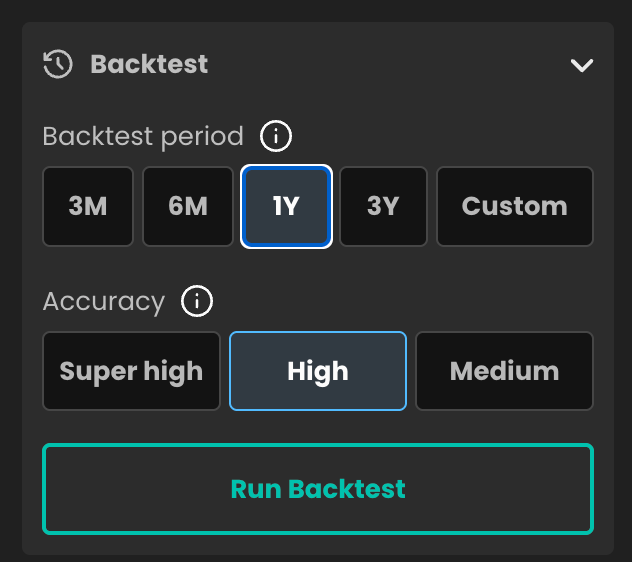
Click Run Backtest
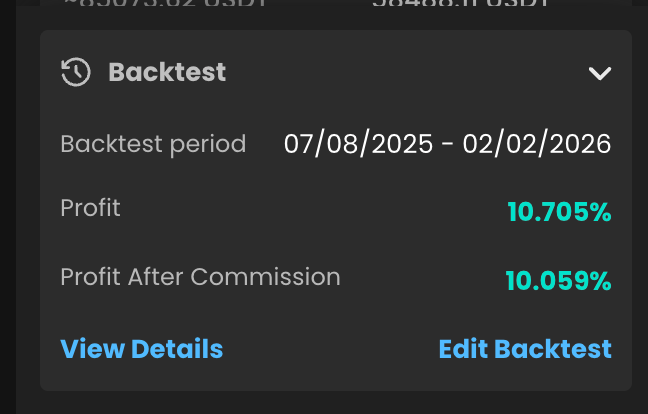
Once the calculation is finished, the results will appear automatically.
Backtest period
Choose the historical range used for simulation:
3M — last 3 months
6M — last 6 months
1Y — last 1 year
3Y — last 3 years
Custom — custom date range
👉 Recommendation: use 3M for a quick check, 6M–1Y for stability analysis.
Accuracy
Accuracy defines the data granularity and order fill assumptions used in the backtest.
⏳ Higher accuracy requires more time to process.
Backtest results overview
Key metrics
Profit — total strategy return
Profit After Fees — net profit after commissions
Backtest period — actual tested date range
Detailed results
Click View Details to open the full backtest report.
1. Basket Results
Overall backtest summary:
total profit
profit after fees
selected accuracy level

2. Transactions
List of completed trading cycles:
date and time
traded amount
buy and sell prices
fees
profit per transaction
cumulative total profit

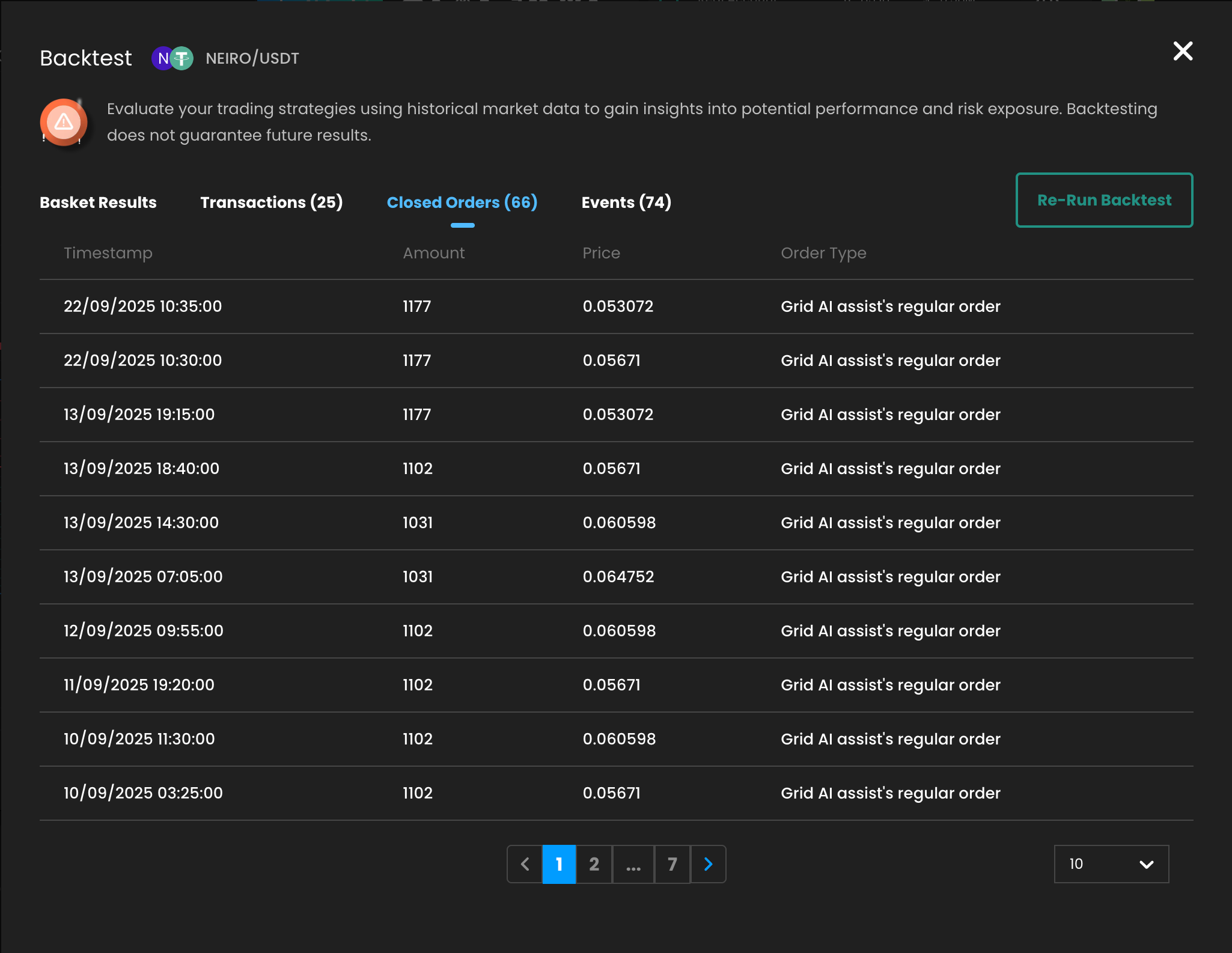
3. Closed Orders
All routed orders created by the strategy:
timestamp
amount
price
order type (Grid, DCA orders, etc.)
Useful for analyzing grid density and Omni logic routing.
4. Events
Log of key strategy events, for example:
Trailing Up — price moved above the upper limit, the strategy shifted the grid and created new upper and lower limits
Other system actions related to Omni or Grid Assist
Hover over the ℹ️ icon to see event explanations.

Re‑Run Backtest
The Re‑Run Backtest button allows you to:
change the backtest period
adjust the accuracy level
instantly compare different scenarios without leaving the results screen
Common issue: insufficient candle data
You may see the following warning:
⚠️ Candle data may be incomplete for this pair and time range — consider changing pair or adjusting dates to avoid inaccurate results.
What this means
The pair does not have enough historical candle data to run an accurate backtest for the selected pair and time range.
Most common reasons
The trading pair is new
The selected period (for example 1Y or 3Y) goes further back than the pair’s available market history.
The trading pair is inactive or has gaps in data
Some pairs are no longer actively traded or have incomplete historical data.
How to fix it
✅ Reduce the backtest period (for example, from 3Y → 1Y or 6M)
✅ Select a different trading pair with a longer and more stable history
This will help ensure more accurate and reliable backtest results.
How to get access to Backtest 2.0
Backtest 2.0 for Omni Assist and Grid AI Assist is available via a dedicated add‑on.
To activate the feature:
Open the Add-ons page
Purchase or enable the required add-on
Refresh the platform — Backtest 2.0 will become available during strategy setup
👉 Get access here:
https://online-line.com/products/online-learning/t-addons/860
Best practices
Start with Medium accuracy + 3M for fast validation
Use High or Super High accuracy before live trading
Compare results across different time periods
Analyze Events and Transactions, not only profit percentage
Important notes
Backtest results are based on historical data only
Real market conditions, liquidity, and routing may differ
Backtesting is a decision‑support tool, not a profit guarantee
🚀 Backtest 2.0 helps you launch more informed and resilient Omni & Grid strategies.
If you need examples or best-practice setups — feel free to ask!
Frequently Asked Questions (FAQ)
What is Backtest 2.0?
Backtest 2.0 is an advanced simulation tool that allows you to test Omni Assist and Grid AI Assist strategies using historical market data before running them in real or paper trading.
Does Backtest guarantee real trading profits?
No. Backtest results are estimates only based on historical data. Real trading conditions such as liquidity, slippage, and routing speed may lead to different results.
Why do I see a warning about insufficient candle data?
This means there is not enough historical data for the selected trading pair and time range.
Most common reasons:
The trading pair is inactive or has gaps in historical data
The trading pair is new and does not have long-term history
How can I fix the insufficient candle data issue?
You can resolve it by:
Choosing a different trading pair with a longer and more stable trading history
Reducing the backtest period (for example, from 3Y to 1Y or 6M)
Which accuracy level should I choose?
Medium — quick testing and idea validation
High — balanced option for most users
Super High — maximum precision before live trading
Higher accuracy levels take longer to calculate.
Can I rerun a backtest with different settings?
Yes. Use the Re-Run Backtest button to adjust the period or accuracy and instantly compare results.
How do I get access to Backtest 2.0?
Backtest 2.0 is available via a dedicated add-on.
You can activate it here:
👉 https://online-line.com/products/online-learning/t-addons/860
Is Backtest 2.0 available for both Omni and Grid strategies?
Yes. Backtest 2.0 supports both Omni Assist and Grid AI Assist strategies.
What should I analyze besides profit percentage?
We strongly recommend reviewing:
Transactions — to understand trade frequency and consistency
Events — to see how the strategy reacts to market movements
Closed Orders — to analyze routing levels and grid behavior
These insights help evaluate risk and strategy quality, not just returns.