Recalculate from Open Price — TP & SL
Written By Ehsaan XP
Last updated 6 months ago
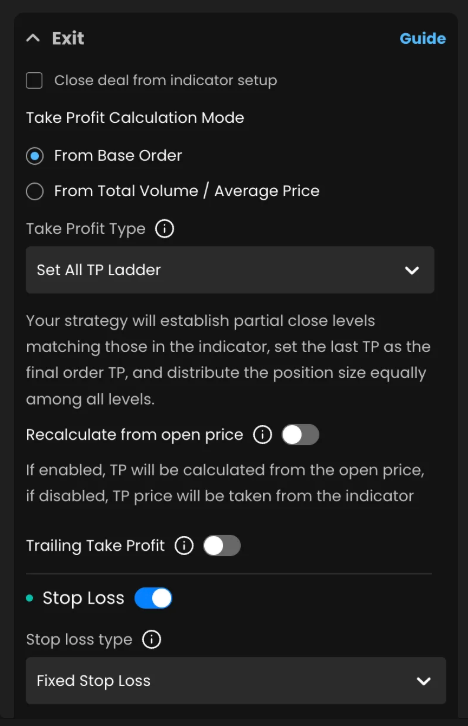
Use these toggles to decide whether indicator‑driven targets should be anchored to your actual deal open price or left exactly as the indicator supplied them.
These options appear when your Take Profit or Stop Loss is sourced from an indicator (e.g., Set All TP Ladder, SL from Indicator).
Where to find it
Assist → Exit
Recalculate from open price (TP) – under the Take Profit block
Recalculate from open price (SL) – under the Stop Loss block
Each option is a simple toggle.
What “open price” means
Open price is the price at which the deal was opened (the Base Order fill). It does not change later if Extra Orders fill.
If you want TP to move with your DCA average after Extra Orders, use Take Profit Calculation Mode → From Total Volume / Average Price. The Recalculate from open price toggles are separate and only affect indicator‑driven targets.
Recalculate from open price (TP)
When ON
Your TP levels are rebuilt from the deal’s open price using the offsets (distances/percentages) provided by the indicator.
Useful when your fill differs from the signal candle price (slippage, delay, re‑entries) and you want consistent R/R from where you actually got filled.
When OFF
Your TP levels are placed exactly at the price(s) given by the indicator (no re‑anchoring).
Best when your indicator outputs absolute targets (e.g., supply/demand zones, pivots) that you want to respect precisely.
Recalculate from open price (SL)
When ON
Your SL is rebuilt from the deal’s open price using the indicator’s stop offset (distance/percent).
Keeps your risk sized from the true entry, regardless of where the signal printed.
When OFF
Your SL is set exactly at the indicator’s stop price (no re‑anchoring).
Best when the indicator’s stop is structure‑based (e.g., swing low/high) you want to keep verbatim.
Why (and when) to enable these
Turn ON when you want:
Consistent risk/reward from your actual fill (slippage or delayed entries).
TP ladders that maintain the same distance from your entry, not the signal candle.
Leave OFF when you want:
Exact absolute levels from your indicator (e.g., structural S/R, VWAP bands, specific pivot targets).
Stops anchored to chart structures (e.g., “below swing low”), even if your fill is far from the signal.
Examples
1) Long, indicator gives relative offsets
Indicator at setup: $100
Indicator TP ladder: +1%, +2%, +3%
Indicator SL: −2%
Your deal opens at $98 (slippage/down‑tick)
TP toggle ON:
TP1 $98.98 (98 × 1.01), TP2 $99.96, TP3 $100.94
TP toggle OFF:
TP1 $101.00, TP2 $102.00, TP3 $103.00
SL toggle ON:
SL $96.04 (98 × 0.98)
SL toggle OFF:
SL $98.00 (100 × 0.98)
2) Short, indicator publishes absolute prices
Indicator TP: $98.5
Indicator SL: $101.5
Your deal opens at $100.8
TP toggle ON:
We infer the indicator’s distance and re‑anchor from $100.8 (keeps the same % distance from your fill).
TP toggle OFF:
TP stays exactly at $98.5
SL toggle ON:
Re‑anchored above $100.8 by the indicator’s stop offset.
SL toggle OFF:
SL stays exactly at $101.5
How this interacts with other settings
Take Profit Calculation Mode (Base vs Average):
Applies to percent‑based TP types. The Recalculate from open price toggles affect indicator‑driven TP/SL only. They are independent.
Trailing Take Profit:
Trailing still begins only after the initial TP trigger. The trigger price itself is determined by these settings.
Extra Orders (DCA):
Recalculate from open price does not move as your average changes; it remains anchored to the initial open price. Use TP Calculation Mode = From Total Volume / Average Price if you want percent‑based TP to follow your average.
Tick size / price steps:
Final order prices are rounded to the exchange’s allowed increments.
Open deals:
Changing either toggle affects new deals only. Existing deals keep the values they started with.
Troubleshooting
“My TP/SL is different from the indicator chart.”
Check whether Recalculate from open price is ON. ON re‑anchors levels to your entry; OFF uses the indicator’s raw prices.
“I added Extra Orders and TP didn’t move.”
That’s expected. These toggles anchor to the open price. To have TP follow your average, use TP Calculation Mode → From Total Volume / Average Price (for percent‑based TP types).
“The stop is too tight/loose after slippage.”
Turn ON to size risk from your true entry; turn OFF to respect the indicator’s structural stop.